Charging your transmitter after each sensor use is important so your transmitter battery lasts 7 days.
When the transmitter is charging, a green light flashes on the gray charger. When charging is complete, the green light on the charger turns off. It can take up to two hours to fully recharge, but typically only takes 15 to 20 minutes. A fully charged transmitter can be used for a maximum of seven days without recharging.
Note: Your transmitter may look different, but the steps to charging it are the same as shown here.
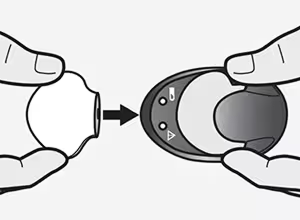
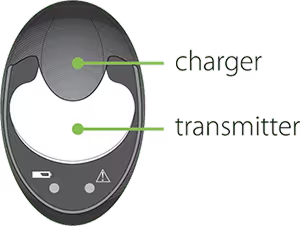
Removing the transmitter from the charger
When you remove the transmitter from the charger, a green light should flash on the transmitter. If you don’t see the green light flash on the transmitter, place the transmitter back on the charger until it is fully charged.

Troubleshooting
If you connect your transmitter to the charger and you see no lights on the charger or a flashing red light, replace the AAA battery in the charger. If the green light stays on without flashing when you connect the transmitter, disconnect it, wait at least 15 seconds, and then try reconnecting.
If there are still no lights on the charger after replacing the batteries, contact 24-Hour Technical Support at 1-800-646-4633 and select option 1.
Check out more transmitter battery tips.
.png)


