.png)


Why a phone-controlled insulin pump system can make diabetes management easier
Published: September 17, 2026 Read time: 3 minutes
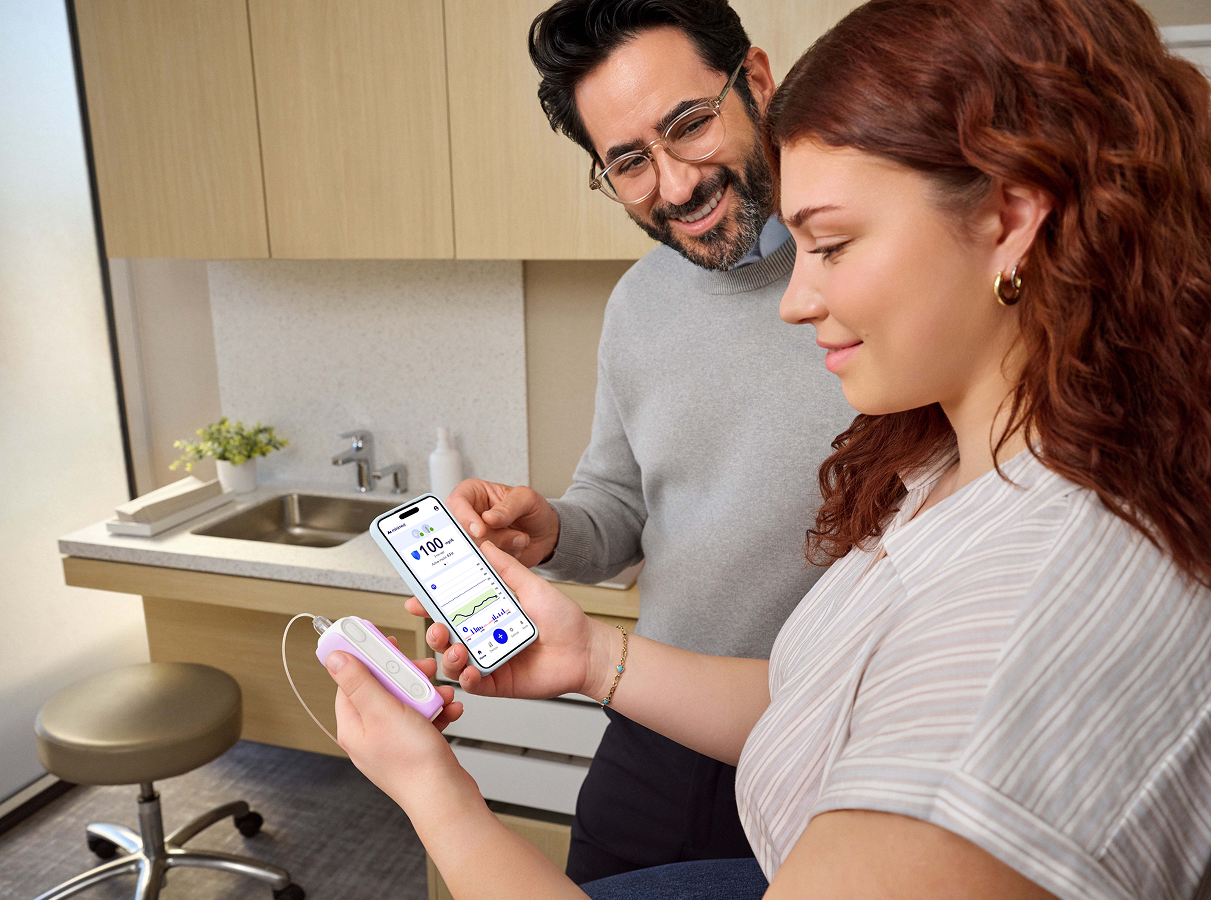
Your smartphone is already with you throughout the day — for texting, scheduling appointments, scrolling social media, and ordering food. With the MiniMed FlexTM system, it can also help you manage your diabetes without having to take out your insulin pump.
For many people, that can make managing those daily diabetes tasks easier, more discreet and less disruptive.
Your pump can stay tucked away
The MiniMed Flex system lets you manage key parts of your insulin therapy right from your smartphone.
With the MiniMed™ app, you can:
- Deliver meal and correction boluses
- View glucose and insulin delivery information together
- Get real-time alerts when something needs your attention
- Check insulin and battery levels
- See glucose trends and daily patterns
- Manage pump settings
Whether you are at dinner, in a meeting, out with friends or simply going about your day, you can manage more of your therapy from the device you already use.
You do not have to be on your phone all day
A phone-controlled pump doesn’t mean you need to constantly check your phone.
When you are using SmartGuardTM technology, MiniMed Flex and your sensor work together in the background to automatically adjust insulin delivery every five minutes based on your sensor glucose information.† Meal DetectionTM technology can also provide additional correction insulin when glucose rises rapidly after an occasional missed bolus or carbs are miscalculated.‡
You will still use your phone to bolus, check detailed information, manage settings or respond to alerts. But between those moments, SmartGuard technology will continue working in the background.
What happens if you do not have your phone?
One of the most common questions about a phone-controlled pump is what happens when your phone is not available.
Your phone is how you interact with MiniMed Flex, but it is not what keeps your insulin delivery running.
If your phone dies, is not nearby or temporarily loses connection, MiniMed Flex continues delivering insulin based on your programmed settings. If you are using SmartGuard mode, automated insulin delivery will continue as long as your sensor and pump remain connected.
You pump will also help keep you informed when your phone is not in your hand. Alerts that need your attention will show up on the MiniMed Flex pump through status lights, sounds and/or vibration, depending on your settings. The pump’s status lights indicate when action is needed immediately, when attention is needed soon, or when no action is needed.
You don’t need Wi-Fi or cellular service for your pump to talk to your phone. The two communicate through Bluetooth, so poor reception or being away from Wi-Fi does not stop regular pump-to-phone communication, as long as Bluetooth is enabled and the devices are within range.
You will still need to reconnect to the MiniMed app to view full alert details and address or clear alerts, as well as to deliver a bolus or make changes to your settings.
And because phones can get lost, run out of battery or need repairs, it’s a good idea to have a backup plan. Talk to your diabetes healthcare team about a plan so you're never caught off guard.
Is a phone-controlled pump right for you?
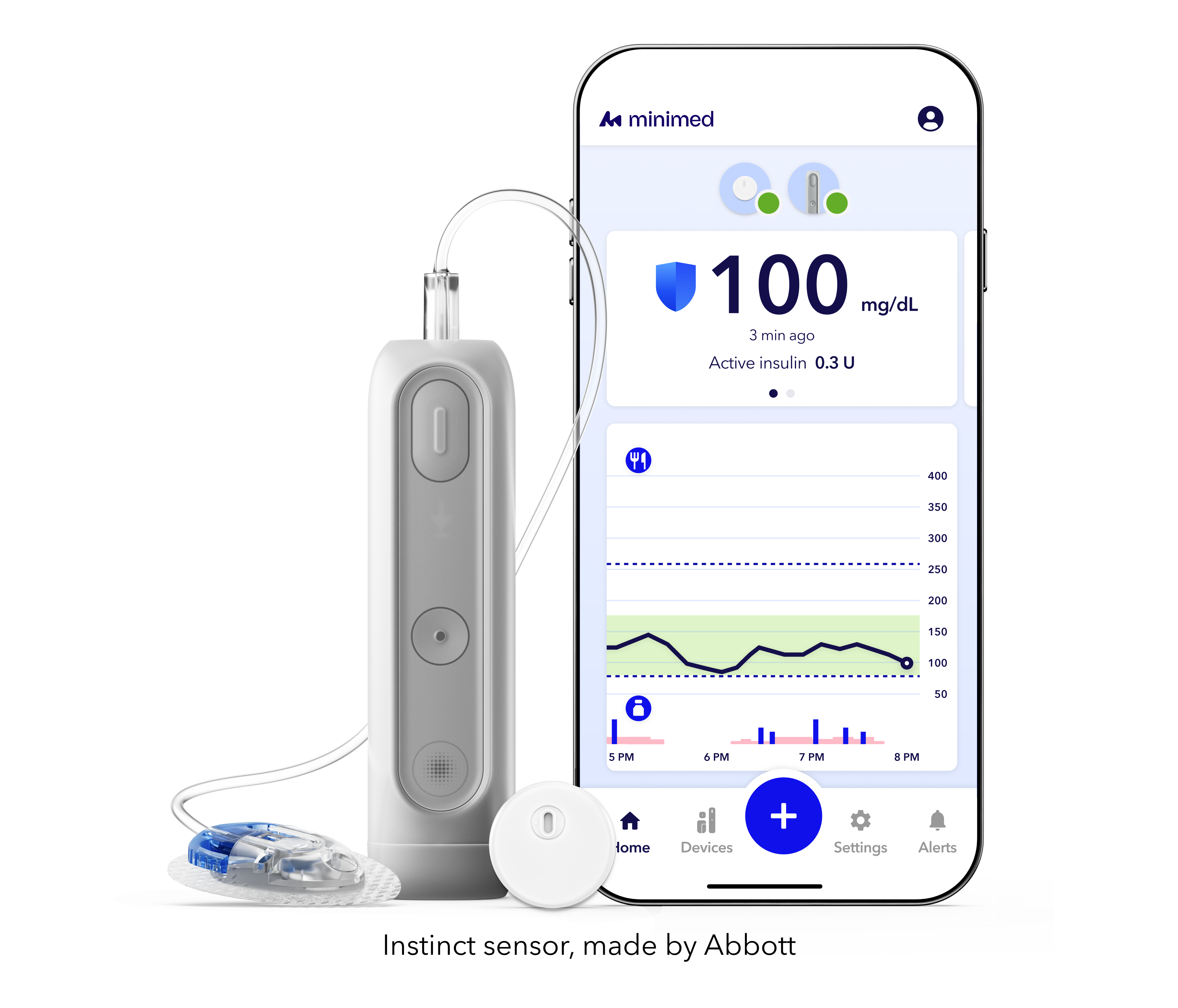
A phone-controlled pump may be worth considering if you want a more discreet and convenient way to manage your insulin pump from your smartphone—while automated insulin delivery works quietly in the background.
Your healthcare team can help you determine whether MiniMed Flex is right for your lifestyle, insulin needs, and treatment goals.
Frequently asked questions


Will MiniMed Flex stop delivering insulin if my phone dies, disconnects, is lost or damaged?


Will MiniMed Flex stop delivering insulin if my phone dies, disconnects, is lost or damaged?
No. If your phone is unavailable or loses connection, MiniMed Flex continues delivering insulin based on your programmed settings.
If you are using SmartGuard mode, automated insulin delivery can continue as long as the sensor and pump remain connected. You will need to reconnect to the MiniMed app to deliver a bolus, view detailed alert information, clear alerts or change settings.
It’s always recommended to have a back-up plan in place should something happen to your phone or the app.
Will I still get alerts if I do not have my phone?
Will I still get alerts if I do not have my phone?
Alerts that require your attention will also show up on the MiniMed Flex pump. Depending on your settings, the pump uses status lights, sounds and/or vibration to let you know when attention is needed. The MiniMed app is where you can view full alert details and address or clear the alert.
What happens if my phone is out of Wi-Fi or cellular range?
What happens if my phone is out of Wi-Fi or cellular range?
Your pump and the MiniMed app communicate through Bluetooth, not Wi-Fi or cellular data. As long as Bluetooth is turned on — even in Airplane Mode — your pump and app can still talk to each other when they are within range. You will need Wi-Fi or a cellular connection to update the MiniMed app or complete a pump software update.
Can I use the MiniMed Flex if I don't have a compatible smartphone?
Can I use the MiniMed Flex if I don't have a compatible smartphone?
If you don’t have a compatible device, you can purchase an App Manager CGM Receiver to use with the MiniMed Flex system. The App Manager CGM Receiver is a device that comes with MiniMed apps preinstalled and is intended specifically for managing your diabetes therapy with MiniMed systems.
Footnotes
† Refers to SmartGuardTM technology. Individual results may vary.
‡ Taking a bolus 15–20 minutes before a meal helps to keep blood sugar levels under control after eating.
Important Safety Information: MiniMed FlexTM system with SmartGuardTM technology with Simplera SyncTM sensor and Instinct sensor
The MiniMed FlexTM system is intended for the continuous delivery of basal insulin at selectable rates, and the administration of insulin boluses at selectable rates for the management of type 1 diabetes mellitus in persons 7 years of age and older, and of type 2 diabetes mellitus in persons 18 years of age and older requiring insulin. The system is also intended to continuously monitor glucose values in the fluid under the skin.
The MiniMed FlexTM system includes SmartGuardTM technology, which can be programmed to automatically adjust insulin delivery based on continuous glucose monitoring (CGM) sensor glucose values and can suspend delivery of insulin when the SG value falls below or is predicted to fall below predefined threshold values. The system is intended for use with connected sensors, including the Simplera SyncTM sensor and integrated continuous glucose monitors, including the Instinct sensor, each of which has different wear-time, form factor, insertion site, and other distinguishing characteristics that relate to sensor performance. Consult the appropriate sensor user guide when using the system. Discuss treatment decisions with your HCP.
WARNING: Do not use the SmartGuardTM feature for people who require less than 8 units or more than 250 units of total daily insulin per day. A total daily dose of at least 8 units, but no more than 250 units, is required to operate in the SmartGuardTM feature.
WARNING: Do not use the MiniMedTM Flex system until appropriate training has been received from a healthcare professional. Training is essential to ensure the safe use of the MiniMedTM Flex system.
WARNING: Do not use SG values to make treatment decisions, including delivering a bolus, while the pump is in Manual Mode. When the SmartGuardTM feature is active and you are no longer in Manual Mode, the pump uses an SG value, when available, to calculate a bolus amount. However, if your symptoms do not match the SG value, use a blood glucose (BG) meter to confirm the SG value. Failure to confirm glucose levels when your symptoms do not match the SG value can result in the infusion of too much or too little insulin, which may cause hypoglycemia or hyperglycemia.
Pump therapy is not recommended for people whose vision or hearing does not allow for the recognition of pump signals, alerts, or alarms. The safety of the MiniMed FlexTM system has not been studied in pregnant women or in persons using other anti-hyperglycemic therapies that do not include insulin. For complete details of the system, including user guides and important safety information such as indications, contraindications, warnings and precautions associated with system and its components, see https://link.minimed.com/Risks.
©2026 Medtronic MiniMed, Inc. MiniMed and MiniMed logo are trademarks of Medtronic MiniMed, Inc. The sensor shape and appearance, Abbott, and “a” logo are marks and/or designs of the Abbott group of companies in various territories and used under license. Sensor image ©2026 Abbott. TM*Third–party brands are trademarks of their respective owners.