.png)


Billing
When to expect a bill
We work closely with your insurance company to make sure you are taken care of. Since every insurance company is different, expect it to take 75-90 days after you receive a new device and supplies to receive your first bill. If you purchased any accessories, and have asked to be billed directly, there will be a separate statement for these items.
If your insurance company needs more information, this may take longer. Your final out-of-pocket cost will depend on the balance from your insurance company after we have worked with them on your behalf.
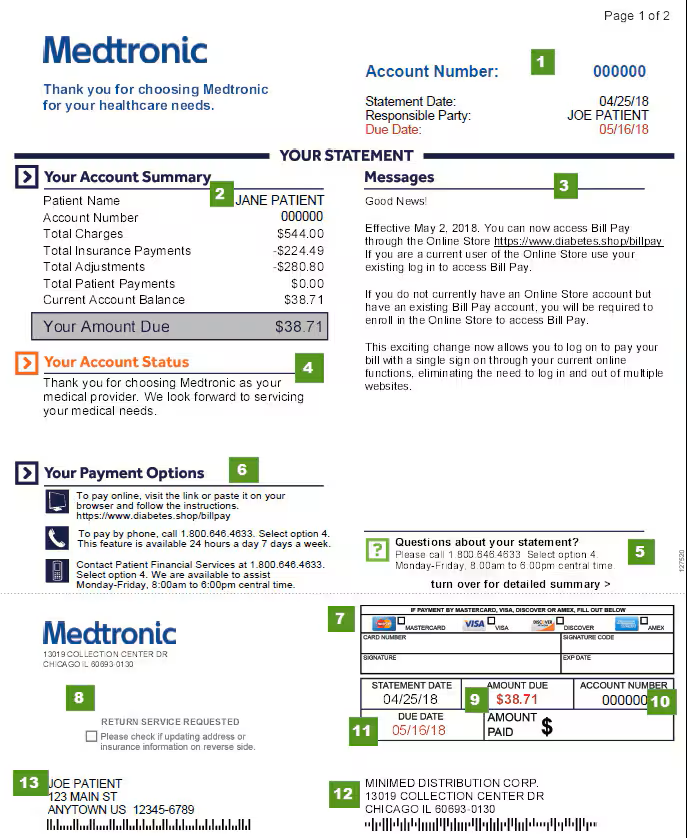
How to read your bill
- Date the statement was printed
- Summary of your account balance
- Important messages and reminders
- The status of your account
- Contact the Patient Financial Services Team at 1-800-646-4633.
- Your payment options
- Area to complete if paying by debit or credit card
- Check this box if providing updated address or insurance information on the back
- Total amount due including any previously unpaid balances
- Your unique Medtronic identification number
- Date payment is due
- Make checks payable to "MiniMed Distribution Corp." and mail to this address
- Name of person financially responsible
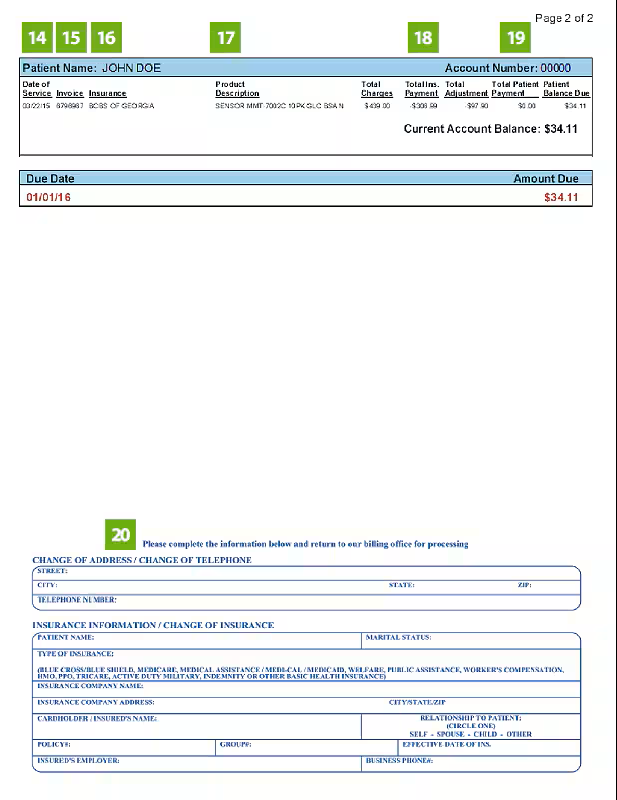
- The date for services provided
- The invoice number for a specific date of service
- The payer who was billed
- Items provided to you on a specific date of service
- Amount paid by your insurance for a particular claim or date of service
- Amount you have paid Medtronic for each individual claim or date of service
- Complete this section if you need to update any personal or insurance information.
Important: If updating information, check the box on the first page (Item 7)
How to pay
Online Bill Pay
Our online bill pay is simple, secure, and available to you anytime you need it. There, you can:
- Access your MiniMed statement information 24 hours a day, seven days a week
- Use your Visa, MasterCard, Discover, or American Express checking/savings account to pay your balance online
New to online bill pay? You can access the portal through Diabetes.shop. Simply log into your account and select Bill pay from the menu.
Need to create an account? Go to Create an account to register.
Mail payment
Debit or credit card
Pay with a debit or credit card by following these steps:
- Fill in the required information in the Account Status section on your bill
- The type of card: Visa, MasterCard, Discover, or American Express
- Card number
- Signature code (the 3-digit security code listed on the back of your card)
- Signature
- Expiration date
- Tear off the bottom piece of the bill
- Put it in the envelope that came with your bill, making sure the address is visible in the clear window
Check or money order
Make your check out to: MiniMed Distribution Corp. and send to the following address. Note that any correspondence related to your billing statement may also be received at this address.
The mailing address is:
MiniMed Distribution Corp.
13019 Collection Center Drive
Chicago, IL 60693-0130
Also make sure to include your account number on the memo line of the check, located on your billing statement.
If you don't have a copy of your billing statement, a Patient Financial Team Member can look it up for you Monday–Friday, 8 a.m.–6 p.m. CT at 1-800-646-4633.
Pay by phone
You can pay by phone Monday–Friday, 8:00 a.m.–6:00 p.m. CT by calling 1-800-646-4633. You will need the customer’s MiniMed account number and date of birth to access this option.
When you call, be prepared to provide:
- The type of card: Visa, MasterCard, Discover, or American Express
- Name on the card
- Expiration date
- Debit or credit card number
- Security code listed on the back of your card