.png)


Mobile app or smart device compatibility
Try installing your app now!
MiniMed apps will notify you once opened on a mobile phone if they cannot be used. If they open and you can proceed to set up, you can continue to use it. Download the app you need and try it now.

MiniMedTM app
The MiniMed app is the primary interface for the MiniMed Flex system. With this app, you can fully control your pump from a compatible phone.



MiniMed GoTM app
The MiniMed GoTM app integrates glucose measurements from a compatible continuous glucose monitor (CGM) with data on insulin doses delivered by the InPenTM smart insulin pen. It alerts when a dose is needed, and also supports automatic dose logging, tracking of active insulin, and a dose calculator.
MiniMedTM Mobile app
You will be able to display key insulin pump data right on your smart device. Discover a new way to interact with your MiniMedTM insulin pump and continuous glucose monitoring (CGM) data.
CareLinkTM Connect app
For care partners. An easy way to remotely view the glucose levels and insulin pump information of a person with diabetes.
InPenTM Smart Pen app
The InPenTM smart insulin pen helps you take the right amount of insulin, at the right time, by automatically tracking your doses and providing personalized insulin recommendations.
Simplera™ App
The SimpleraTM continuous glucose monitoring (CGM) system lets users continuously view glucose values throughout the day, sends alerts for glucose events in a convenient and discreet manner on a mobile device.
CGM Clinical App
The CGM Clinical app collects sensor glucose (SG) data for research purposes and is intended for use only in clinical trials. App users cannot view the SG data.
Search by compatible devices
If your current device isn’t compatible or you’re looking for a new one, you can search for compatible devices below.

Android is a trademark of Google LLC.
"Google Play" is a property of Google LLC.
AppStore® online store is a service mark of Apple Inc.
See list of devices by app
Check System status
Check the current status of MiniMed applications and services.
Frequently asked questions
How can I find the model number of my Android mobile device?


How can I find the model number of my Android mobile device?
To identify the model number of your device, see below:
- Settings > About Phone
Note: Android™ phone devices (e.g., Samsung Galaxy 10) have multiple model numbers, which indicate details specific to the device. These model numbers are listed above in parenthesis (e.g. SM-G973F). Only Android phone device model numbers listed in the table above are compatible with the MiniMed™ 770G system. The device model number can be found by navigating to the phone’s settings, opening device settings, and then by tapping “About phone.”
How can I find the model number of my Apple mobile device?
How can I find the model number of my Apple mobile device?
To identify the model number of your device, see below:
- Settings > General > About
What if my mobile device isn’t on the list of compatible devices?
What if my mobile device isn’t on the list of compatible devices?
If your mobile device isn't on the compatible list, you won't be able to use the MiniMed™ Mobile app. However, you can still use the MiniMed™ 780G pump, Simplera Sync sensor, Guardian 4 transmitter and sensor without the app.
If you are using the Instinct sensor, the MiniMed™ Mobile app is required to pair your pump and sensor. In this case, you will need a compatible device to complete the setup and use the sensor.
What is the App Manager?
What is the App Manager?
The App Manager CGM Receiver enables the use of a MiniMed app to view CGM data and to help manage therapy using a MiniMed device. The App Manager CGM Receiver can only be used to access apps provided by MiniMed for diabetes treatment purposes. You only need an App Manager if your smartphone isn’t compatible and/or your insurance plan requires that we include it as part of your order.
How can I keep my operating system compatible with the MiniMed™ system?
How can I keep my operating system compatible with the MiniMed™ system?
Turning off Automatic Updates on your mobile device may help you avoid unintentionally updating to an operating system that is not confirmed as compatible with the MiniMed™ systems mobile apps.
The MiniMed™ systems are medical devices and we do extensive testing on all updates. You may experience a delay from when Apple or Android™ releases a new operating system / device model and when the mobile apps are compatible. Before updating your operating system or device, check the compatibility list above.
How can I turn off automatic updates for my Apple device’s operating system?
How can I turn off automatic updates for my Apple device’s operating system?
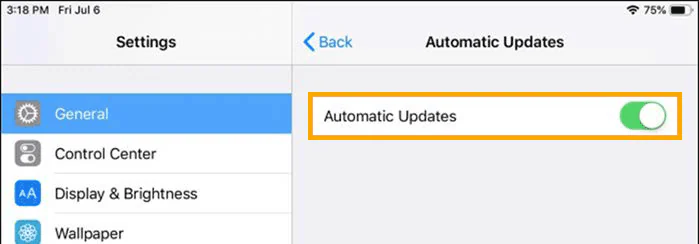
From the settings menu, go to General, go to Software Updates and set Automatic Updates to the “off” position.
How can I turn off automatic updates for my Android device’s operating system?
How can I turn off automatic updates for my Android device’s operating system?
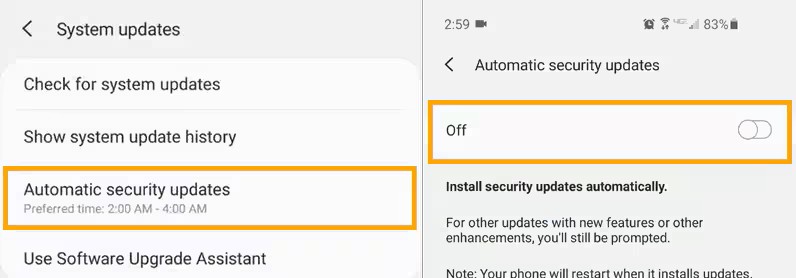
From the System updates menu, select Automatic security updates and turn OFF.
† iPhone® mobile digital device is a registered trademark of Apple Inc.
§ Samsung® is a registered trademark of Samsung.
∆ Smart devices sold separately. For a list of compatible devices, refer to user guide.
Important Safety Information: MiniMedTM 780G system with SmartGuardTM technology with Instinct sensor, Simplera SyncTM sensor, and GuardianTM 4 sensor
The MiniMedTM 780G system is intended for the continuous delivery of basal insulin at selectable rates and the administration of insulin boluses at selectable rates for the management of type 1 diabetes mellitus in persons 7 years of age and older, and of type 2 diabetes mellitus in persons 18 years of age and older requiring insulin. The system is also intended to continuously monitor glucose vales in the fluid under the skin.
The MiniMedTM 780G System includes SmartGuardTM technology, which can be programmed to automatically adjust insulin delivery based on the continuous glucose monitoring (CGM) sensor glucose values and can suspend delivery of insulin when the sensor glucose (SG) value falls below or is predicted to fall below predefined threshold values. The system is intended for use with connected sensors, including the Simplera SyncTM and GuardianTM 4 sensors and integrated continuous glucose monitors, including the Instinct sensor, each of which has different wear-time, form factor, insertion site, and other distinguishing characteristics that relate to sensor performance. Consult the appropriate sensor user guide when using the system. Discuss treatment decisions with your HCP.
WARNING: Do not use the SmartGuardTM feature for people who require less than 8 units or more than 250 units of total daily insulin per day. A total daily dose of at least 8 units, but no more than 250 units, is required to operate in the SmartGuardTM feature.
WARNING: Do not use MiniMedTM 780G system until appropriate training has been received from a healthcare professional. Training is essential to ensure the safe use of MiniMedTM 780G system.
WARNING: Do not use SG values to make treatment decisions, including delivering a bolus, while the pump is in Manual Mode. When the SmartGuardTM feature is active and you are no longer in Manual Mode, the pump uses an SG value, when available, to calculate a bolus amount. However, if your symptoms do not match the SG value, use a blood glucose (BG) meter to confirm the SG value. Failure to confirm glucose levels when your symptoms do not match the SG value can result in the infusion of too much or too little insulin, which may cause hypoglycemia or hyperglycemia.
Pump therapy is not recommended for people whose vision or hearing does not allow for the recognition of pump signals, alerts, or alarms. The safety of the MiniMedTM 780G system has not been studied in pregnant women or in persons using other anti-hyperglycemic therapies that do not include insulin. For complete details of the system, including user guides and important safety information such as indications, contraindications, warnings and precautions associated with system and its components, see https://link.minimed.com/Risks.
©2026 Medtronic MiniMed, Inc. MiniMed and MiniMed logo are trademarks of Medtronic MiniMed, Inc. The sensor shape and appearance, Abbott, and “a” logo are marks and/or designs of the Abbott group of companies in various territories and used under license. Sensor image ©2026 Abbott. TM*Third–party brands are trademarks of their respective owners.
DreaMed Diabetes is a trademark of DreaMed Diabetes, Ltd. The MiniMedTM 780G system algorithm includes technology developed by DreaMed Diabetes.
Important Safety Information: MiniMedTM Mobile App
The MiniMedTM Mobile app is intended to provide a secondary display for a compatible MiniMedTM insulin pump system on a suitable consumer electronic device for passive monitoring and to sync data to CareLinkTM system. The MiniMedTM Mobile app is not intended to replace the real-time display of Continuous glucose monitoring or insulin pump data on the primary display device (i.e., the insulin pump). All therapy decisions should be based on the primary display device. The MiniMedTM Mobile app is not intended to analyze or modify the continuous glucose monitoring data or insulin pump data that it receives. Nor is it intended to control any function of the connected continuous glucose monitoring system or insulin pump. The MiniMedTM Mobile app is not intended to receive information directly from the sensor or transmitter of a continuous glucose monitoring system. CARELINKTM CONNECT APP The CareLinkTM Connect app is intended to provide a secondary display of insulin pump and CGM (Continuous Glucose Monitor) data on a supported mobile device. CareLinkTMConnect app is not intended to replace the real-time display of insulin pump or CGM data on the primary display device. All therapy decisions should be based on the primary display device. CareLinkTM Connect app is not intended to analyze or modify the insulin pump and CGM data that it receives. Nor is it intended to control any function of the insulin pump or CGM system to which it is connected. CareLinkTM Connect app is not intended to receive information directly from the insulin pump or CGM system. For additional safety information and user guides, see https://link.minimed.com/Risks.
Important Safety Information: CareLinkTM Connect App
The CareLinkTM Connect app is intended to provide a secondary display of insulin pump and CGM (Continuous Glucose Monitor) data on a supported mobile device. CareLinkTM Connect app is not intended to replace the real-time display of insulin pump or CGM data on the primary display device. All therapy decisions should be based on the primary display device. CareLinkTM Connect app is not intended to analyze or modify the insulin pump and CGM data that it receives. Nor is it intended to control any function of the insulin pump or CGM system to which it is connected. CareLinkTM Connect app is not intended to receive information directly from the insulin pump or CGM system. For additional safety information and user guides, see https://link.minimed.com/Risks.