URGENT MEDICAL DEVICE CORRECTION

Insulin pump battery cap

MiniMed™ 630G (MMT-1515, MMT-1714, MMT-1715, MMT-1754, MMT-1755)
MiniMed™ 670G (MMT-1580, MMT-1581, MMT-1582, MMT-1780, MMT-1781, MMT-1782, MMT-1740, MMT-1741, MMT-1742, MMT-1760, MMT-1761, MMT-1762)
MiniMed™ 770G (MMT-1880, MMT-1881, MMT-1882, MMT-1890, MMT-1891, MMT-1892)
MiniMed™ 780G (MMT-1884, MMT-1885, MMT-1886, MMT-1894, MMT-1895, MMT-1896)

Insulin Pump Battery Cap Notification — Download 2022

Insulin Pump Battery Cap for the MiniMedTM 600 series and MiniMedTM 770G insulin pumps — Download 2024

Insulin Pump Battery Cap for the MiniMedTM 780G insulin pumps — Download 2024


For your safety, we want to inform you of a potential issue relating to your pump’s battery cap and provide actions you should take. Please carefully review the information below.

ISSUE DESCRIPTION

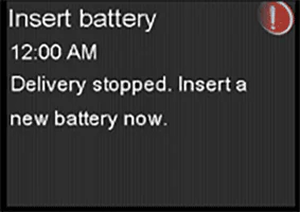
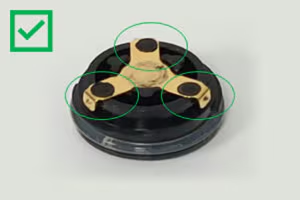
The battery cap on the pump consists of a plastic cap and a metal contact that work together with the AA battery to power the pump. The metal contact should be held in place by three raised, round, black plastic dots, as pictured below. If the metal contact becomes loose or falls off from the battery cap, it can result in an incomplete battery connection, leading to no power source to the pump. When the pump detects no power source, an “Insert battery” alarm will occur, and insulin delivery will immediately stop. After 10 minutes, the alarm sound may increase to a siren, and the pump will turn off.

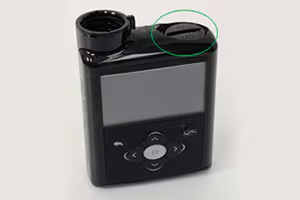
The battery cap can be found on the top of the pump where the AA battery compartment is located

Sample screen image of “Insert battery” alarm

Undamaged battery cap – CONTINUE TO USE – has 3 raised, round, black plastic dots holding metal contact in place

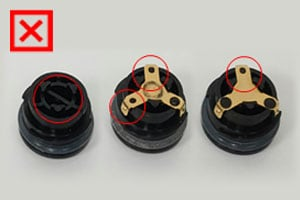
Damaged battery caps – DO NOT USE – metal contact is missing, or fewer than 3 raised dots can be seen

If the pump stops delivery of insulin due to power loss, this could lead to varying degrees of high blood sugar, including diabetic ketoacidosis (DKA). Serious injuries have been reported with the use of the MiniMedTM 600 series and MiniMedTM 700 series insulin pumps associated with the damaged cap, but not all have been directly correlated to this issue based on review with independent clinical experts. Damaged battery cap contacts could potentially lead to those events as explained above. Please notify Medtronic of any adverse events, if the metal contact on your battery cap is damaged, or other quality problems associated with your use of this product by calling the MiniMed 24-Hour Technical Support line at 877-496-7933.

Adverse reactions or quality problems experienced with the use of this product may also be reported to the FDA’s MedWatch Adverse Event Reporting program either online, by regular mail, or by fax.

ACTIONS REQUIRED

Before you begin: Do not remove the battery cap unless you have a new battery available. If you have a spare undamaged battery cap, ensure it is available nearby.

  • During routine battery replacement, check the metal contact on your pump battery cap to see if it is loose, damaged, or missing. Do not try to lift or move the metal contact upon inspection. You can view animated instructions on how to inspect the battery cap contact through our website at www.minimed.com/battery-cap-guide.
    • If the battery cap contact is damaged, immediately replace it with a spare cap that you may have received with your original pump shipment, and discard the damaged cap. If you do not have a spare cap, stop using your pump and revert to a backup plan per your healthcare provider’s recommendations. Then, request a spare battery cap online at info.medtronicdiabetes.com/battery-cap-form, or contact Medtronic 24-Hour Technical Support at 877-496-7933.
    • If you are unsure if the battery cap contact is damaged, replace it with a spare cap or request a spare battery cap online at info.medtronicdiabetes.com/battery-cap-form, or contact Medtronic 24-Hour Technical Support at 877-496-7933.
    • If the battery cap contact is not damaged, continue to use your pump and monitor for cap damage during battery replacement, and complete and return the attached confirmation form by mail. We will send you a spare cap in the coming months.
    • Always pay close attention to the pump and pump battery status after inserting the new battery.
       
  • Acknowledge that you have read and understood this notification and have followed the steps listed above by completing and returning the attached confirmation form by mail, or by submitting the battery cap request form online. We will continue to remind you of this communication until we receive your response.


OUR COMMITMENT

We are working on a new design for the cap and we will keep you updated when we ship one once it is approved and available for use. We are committed to continuously monitoring and improving your experience with our products and will proactively share important safety updates.

We understand this impacts your experience and are here to support you. If you have further questions, please call the MiniMed 24-Hour Technical Support line at 877-496-7933.

Frequently asked questions

Is this a recall?

Add icon collapse icon

Yes, by definition, this is a recall. A “recall” as defined by the FDA, “does not always mean that you stop using the product or return it to the company. A recall sometimes means that the medical device needs to be checked, adjusted, or fixed.”

(www.fda.gov/medical-devices/medical-device-recalls/what-medical-device-recall).

Does this impact all the MiniMedTM 600 and MiniMedTM 700 series insulin pumps?

Add icon collapse icon

Yes, this issue affects all MiniMedTM 600 and MiniMedTM 700 series insulin pumps.

I think my battery cap contact is damaged and I do not have a spare battery cap. What should I do?

Add icon collapse icon

If you do not have a spare cap, stop using your pump and revert to a backup plan per your healthcare provider’s recommendations. Then, request a spare battery cap online at info.medtronicdiabetes.com/battery-cap-form, or contact MiniMed 24-Hour Technical Support at 877-496-7933.

My battery cap contact is not damaged, can I continue to use my pump?

Add icon collapse icon

Yes, you can continue to use your pump and monitor for cap damage during battery replacement. Always pay close attention to the pump and pump battery status after inserting the new battery.

Does my pump require replacement due to this recall?

Add icon collapse icon

No, your pump does not require replacement due to this issue. However, you would need a replacement battery cap if your current cap is damaged. Request a spare battery cap online at https://info.medtronicdiabetes.com/battery-cap-form, or contact MiniMed 24-Hour Technical Support at 877-496-7933.

How often should I inspect the battery cap?

Add icon collapse icon

Always pay close attention to the pump, battery cap, and pump battery status after inserting the new battery.