.png)


Yes, by FDA definition, this is a recall. A “recall,” as defined by the FDA, “does not always mean that you stop using the product or return it to the company." A recall sometimes means that the medical device needs to be checked, adjusted, or fixed.
(www.fda.gov/medical-devices/medical-device-recalls/what-medical-device-recall).
URGENT MEDICAL DEVICE CORRECTION
MiniMedTM 600 series pump system communication issue
| Insulin Pump | Model Number |
|---|---|
| MiniMed™ 630G | MMT-1715, MMT-1755, MMT-1754 |
| MiniMed™ 670G | MMT-1780, MMT-1781, MMT-1782, MMT-1760, MMT-1761, MMT-1762, MMT-1740, MMT-1741, MMT-1742 |
MiniMedTM 600 Series Pump System Communication Issue Notification — Download
September 2022
For your safety, we want to inform you of a potential issue associated with the communication protocol used by your pump system. Unauthorized access to your pump’s communication protocol could compromise your pump’s delivery of insulin. This letter provides actions and mitigations you should take so please carefully review the information below.
ISSUE DESCRIPTION
MiniMedTM 600 series insulin pump*
GuardianTM Link 3 transmitter
Contour® Next Link 2.4 Blood Glucose Meter
CareLinkTM USB
The MiniMedTM 600 series pump system consists of components such as the pump, continuous glucose monitoring (CGM) transmitter, blood glucose meter and CareLink™ USB device that communicate wirelessly. MiniMed has identified a potential issue through internal testing whereby, under specific circumstances, the communication between the components of the pump system could be compromised through unauthorized access.
For unauthorized access to occur, a nearby person other than you or your care partner would need to gain access to your pump at the same time that the pump is being paired with other system components. This cannot be done over the internet.
MiniMed has no evidence to date that such an issue has occurred. However, in the unlikely event that unauthorized access would be successful, the access could be used to deliver too much or too little insulin through delivery of an unintended insulin bolus or because insulin delivery is slowed or stopped. Too much insulin could result in hypoglycemia (low blood sugar) which can potentially lead to seizure, coma or death. Too little insulin could result in hyperglycemia (high blood sugar) which can potentially lead to diabetic ketoacidosis.
MiniMed recommends all patients take the actions and precautions listed below.
ACTIONS REQUIRED
- Turn off the “Remote Bolus” feature on your pump if it is turned on.
Note that the “Remote Bolus” capability is on by default, so you should take this action even if you have never used this feature. See Appendix: “How to Turn Off Remote Bolus Settings” or by visiting our website at www.minimed.com/remote-bolus.
- Conduct any connection linking of devices in a non-public place.
RECOMMENDED PRECAUTIONS:
- Keep your pump and connected system components within your control at all times.
- Be attentive to pump notifications, alarms, and alerts.
- Immediately cancel any boluses you or your care partner did not initiate, monitor blood glucose levels closely and reach out to Medtronic 24-Hour Technical Support to report the bolus. NOTE: Turning off Remote Bolus feature will ensure no Remote Bolus is possible.
- Disconnect the USB device from your computer when you’re not using it to download pump data.
- DO NOT confirm remote connection requests or any other remote action on the pump screen unless it is initiated by you or your care partner.
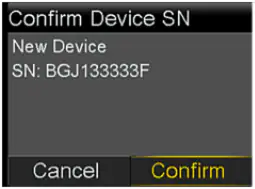
6. DO NOT share your pump’s or devices’ serial numbers with anyone other than your healthcare provider, distributors, and Medtronic.
7. DO NOT accept, calibrate, or bolus using a blood glucose reading you didn’t initiate.
8. DO NOT connect to or allow any third-party devices to be connected to your pump.
9. DO NOT use any software which has not been authorized by Medtronic as being safe for use with your pump.
10. Get medical help immediately when experiencing symptoms of severe hypoglycemia or diabetic ketoacidosis.
11. Reach out to Medtronic 24-Hour Technical Support if you suspect a pump setting or insulin delivery have changed unexpectedly, without your knowledge.
As always, we’re here to support you. Please contact Medtronic 24-Hour Technical Support at 1-800-646-4633, option 1 if you suspect unauthorized access has occurred or if you experience any adverse events or quality problems with your device.
Adverse reactions or quality problems experienced with the use of this product may also be reported to the FDA's MedWatch Adverse Event Reporting program:
- Submit online: www.fda.gov/medwatch/report.htm
- Submit by regular mail or fax: Download form www.fda.gov/MedWatch/getforms.htm or call 1-800-332-1088 to request a form, then complete and return to the address on the pre-addressed form, or submit by fax to 1-800-FDA-0178.
We understand this may impact your experience and are here to support you.
The best step you can take now to eliminate your individual risk of unintended delivery of insulin is to permanently turn off the Remote Bolus feature on your pump. We will continue to actively monitor the situation and are committed to sharing relevant information or actions with you in the future.
Chirag Tilara
Vice President, Quality
Medtronic Diabetes
Robert Vigersky, M.D.
Chief Medical Officer
Medtronic Diabetes
How to Turn Off Remote Bolus Settings
Follow these steps to turn off Remote Bolus feature:
MiniMedTM 670G Insulin Pump (MMT-1780, MMT-1781, MMT-1782)
Note: The Remote Bolus feature is not available when in SmartGuard™ Auto Mode
1. If Auto Mode is active, Auto mode must first be deactivated to enter manual mode using the following step:
Press Center Button and go to the Auto Mode settings screen.
Options > SmartGuard > Auto Mode

2. Select Save
3. In manual mode, Press Center Button and go to the Remote Bolus screen.
Options > Utilities > Remote Bolus
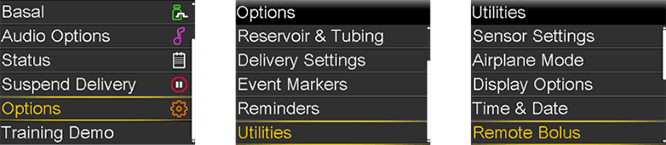
The Remote Bolus screen appears.
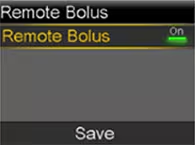
4. Select Remote Bolus to turn the feature off.
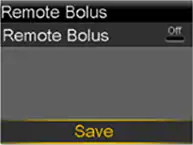
5. Select Save
If you wish to reactivate Auto Mode, go to the Auto Mode settings screen.
Options > SmartGuard > Auto Mode
MiniMedTM 630G (MMT-1714, MMT-1715)
Note: Remote Bolus default settings is "ON".
Press Menu Button (
 ) and go to the Remote Bolus screen.
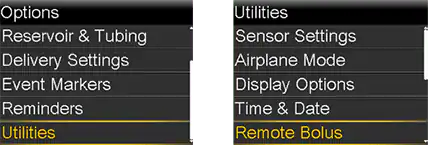
The Remote Bolus screen appears
2. Select Save
3. Select Remote Bolus to turn the feature off.
4. Select Save
Frequently asked questions
Is this a recall?


Is this a recall?
Is this notification associated with the recalls Medtronic issued last year?
Is this notification associated with the recalls Medtronic issued last year?
No, this notification is not associated with prior recalls issued by Medtronic.
Is this a new issue?
Is this a new issue?
Medtronic identified this potential communication issue through internal testing. Because customer safety, awareness and customer satisfaction are our top priorities, Medtronic is proactively notifying impacted customers to ensure that they are made aware of the potential communication risks associated with MiniMed™ 600 series insulin pumps and recommended steps to reduce these risks.
Yes, this potential communication issue impacts all MiniMed™ 600 series insulin pumps.
Does this impact other MiniMed™ insulin pumps?
Does this impact other MiniMed™ insulin pumps?
No, this potential communication issue does not impact other MiniMed™ insulin pumps, including the Paradigm™ series or MiniMed™ 700 series pumps.
Does my pump require replacement?
Does my pump require replacement?
No, you do not have to replace your pump due to this issue. Customers with a MiniMed™ 600 series insulin pump should follow the recommended steps in the communication from Medtronic to reduce communication risks, including permanently turning off the Remote Bolus feature to eliminate their individual risk of unintended delivery of insulin and avoiding pairing the pump in public.
How do I report any adverse event associated with this issue?
How do I report any adverse event associated with this issue?
Please contact Medtronic 24-Hour Technical Support at 1-800-646-4633, option 1 if you suspect unauthorized access has occurred or if you experience any adverse events or quality problems with your device.
How do I protect my pump’s and devices’ serial numbers?
How do I protect my pump’s and devices’ serial numbers?
Be mindful of who you share your devices serial numbers with. Do not share them with anyone other than your healthcare providers, distributor, or your Medtronic representatives.