.png)


MiniMedTM 530G system support and resources
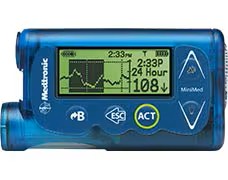
Easily navigate through our comprehensive user guide by expanding the sections below for your given topic and locating the page number.
Basic pump information


Basic pump information
- Find your model number
- Find your serial number
- Reading your device screen (Page 44)
- Updating time and date (Page 55)
- Changing your battery (Page 44)
- Suspending and resuming insulin delivery (Page 49)
- Saving, Restoring, & viewing your pump settings (Page 196)
- Changing the language on your pump (Page 57)
Pump, alarms, and alerts
Pump, alarms, and alerts
- Alerts and alarms (Page 217)
Basal settings
Basal settings
- Change your Basal Rates (Page 73)
- Setting a Temp Basal Rate (Page 131)
- Changing your Max Basal Amount (Page 75)
- Setting/Changing a Basal Pattern (Page 127)
Bolus settings
Bolus settings
- Changing Your Bolus Wizard settings (Page 102)
- Changing your Max Bolus Amount (Page 64)
- Changing your Easy Bolus (Page 123)
- Setting your Dual Wave Bolus (Page 118)
- Setting your Square Wave Bolus (Page 121)
Infusion sets
Infusion sets
Meter settings
Meter settings
- Linking your pump to a meter (Page 203)
- Setting up your meter communication settings (Page 163)
Sensor settings
Sensor settings
- Turning on continuous glucose monitoring (CGM) (Page 146)
- Setting your sensor settings (Page 145)
- Reading your sensor graphs (Page 167)