.png)


Setting up Easy BolusTM
Device: MiniMedTM 780G insulin pump
Before you use the Easy BolusTM feature, you must turn on the feature and set the step size. The step size determines the number of units the bolus amount increases each time you press the Up button. Your Easy BolusTM delivery is limited to 20 steps or your max bolus limit, whichever comes first.
Easy BolusTM is not available while in SmartGuardTM technology.
To set up the Easy BolusTM feature:
- From the Home screen, press Select.
- Select Settings.
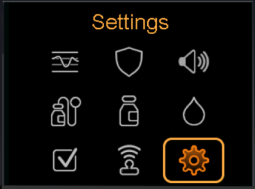
- Select Device Settings.
- Select Easy Bolus.
- Select Easy Bolus again to turn it on.
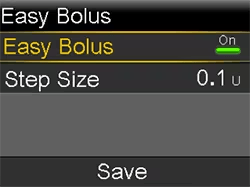
- Set the Step Size amount in units. You can set the step size from 0.1 to 2.0 units. Your step size cannot be higher than your max bolus.
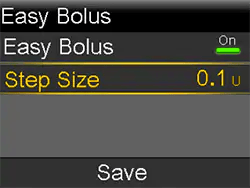
- Select Save.
To use the Easy BolusTM feature, your pump must be in Sleep Mode. Your pump automatically goes into Sleep Mode two minutes after the screen turns off.
To deliver a bolus using the Easy BolusTM feature:
- While your pump is in Sleep Mode, press and hold the Up arrow for about one second. After your pump beeps or vibrates, release. You can now start to program your bolus with the Easy BolusTM feature.
- Press the Up button the number of times needed to set your bolus amount. Each time you press Up, your pump makes a tone or vibrates, and your bolus amount increases by the number of units set for the step size.
- When you reach the desired bolus amount, press and hold Up to confirm the amount. Your pump beeps or vibrates for each button press. Count to ensure the amount is correct. If the amount is incorrect, press and hold Down until you hear a tone, and then start again from step 1.
- When the bolus amount is confirmed, press and hold Up for about one second to deliver your bolus. Your pump beeps or vibrates. Your bolus starts immediately after the confirmation.