.png)


Find your software version
Device: MiniMedTM 780G insulin pump
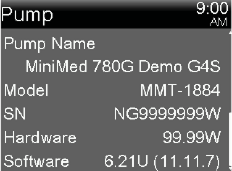
Your pump’s software version helps you know what features and sensors apply to your system. Here’s how to find it on your MiniMedTM 780G pump.
To view the status screens:
1. From the Home screen, press Select.†
2. Select Status.
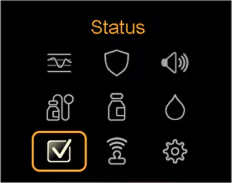
3. Select Pump.
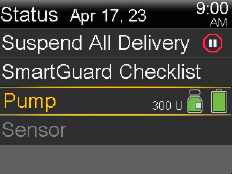
4. Scroll down to find Software.
† Alternatively, you can access the Status screen by pressing the Up arrow from the Home screen.