.png)


High settings
Device: MiniMedTM 780G insulin pump
Note: The MiniMedTM 780G system has a High SG Alert that alerts when the SG is at 250 mg/dL or more for more than 3 hours. This alert is fixed and cannot be changed. For this reason, it is a best practice to keep the Alert on High OFF.
To set up the high SG settings:
- From the Home screen, press Select.
- Select Settings.
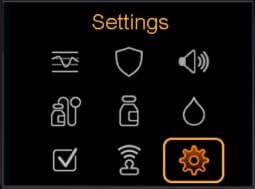
- Select Alert Settings
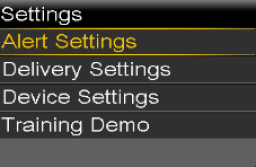
- Select High Alert.
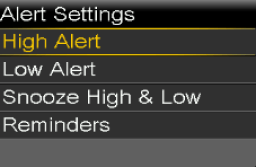
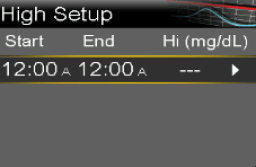
- Select the time segment. The end time flashes.
The start time of the first time segment is always 12:00 A. Up to eight time segments can be set, each with a different high limit. All the time segments must add up to a 24-hour period. - Set the End time.
- Set the high limit, from 100 mg/dL to 400 mg/dL, in increments of 5 mg/dL.
- Select the arrow to the right to the End time to select the high alerts for the time segment.
A screen appears and shows the high alerts for the selected time segment. - Set the following alerts, as desired:
- Select Alert before high to receive an alert before the high limit is reached.
- Set the Time before high option between 5 to 30 minutes to receive an alert before the high limit is reached.
- Select Alert on high to receive an alert when the high limit is reached.
- Select Rise Alert to receive an alert when SG is rising quickly.
- If Rise Alert is on, perform the following steps to set up the Rise Limit. Otherwise, proceed to step 11.
- Scroll down and select Rise Limit. The Rise Limit screen appears.
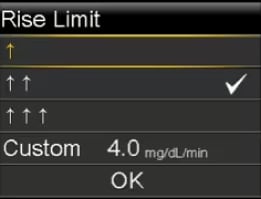
- Select one, two, or three arrows for the rise rate, or enter a custom rate.
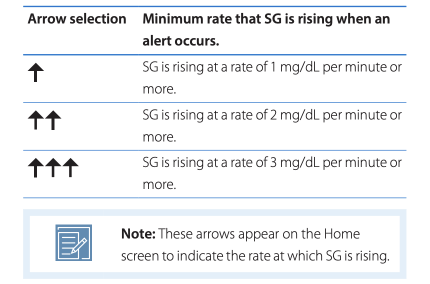
- To enter a custom rate, select Custom, enter the Rise Limit on the Custom Limit screen, and then select OK.
- Select OK again to confirm the Rise Limit setting.
- Select Next.
- If necessary, enter the remaining time segments to complete the 24-hour period.
- Select Review.
- Review the high SG settings and select Save.
To change the high SG settings:
- From the Home screen, press Select.
- Select Settings.
- Select Alert Settings.
- Select High Alert.
- Select Edit.
- Select and adjust the time segment.
- Select any alert setting to make adjustments, or to turn the setting on or off.
- Select Next.
- Select Review.
- Review the high SG settings and select Save.