.png)


Low settings
Device: MiniMedTM 780G insulin pump
Note: The MiniMedTM 780G System has a Low SG Alert that alerts when the SG is at 54 mg/dL (with GuardianTM Sensor 3) or 64 mg/dL (with GuardianTM 4 sensor). This alert is fixed and cannot be changed.
To set up the low SG settings:
- From the Home screen, press Select.
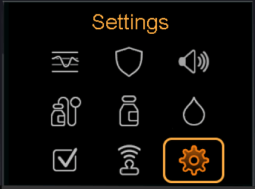
- Select Settings.
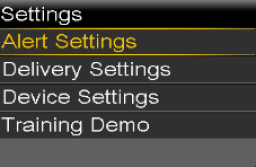
- Select Alert Settings.
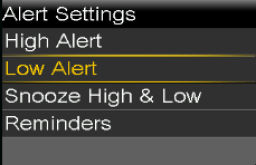
- Select Low Alert.
- Select the time segment. The end time flashes.
The start time of the first time segment is always 12:00 A. Up to eight time segments can be set, each with a different low limit. All the time segments must add up to a 24-hour period. - Set the End time.
- Set the low limit, from 50 mg/dL to 90 mg/dL, in increments of 5 mg/dL.
- Select the arrow to the right to the End time to select the low SG settings for the time segment.
A screen appears and shows the available settings for the selected time segment. - Set the following alerts, as desired:
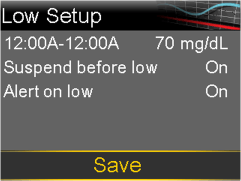
- Select Suspend before low to set the pump to suspend insulin delivery before the low limit is reached.
- Select Alert before low to receive an alert before the low limit is reached.
- Select Suspend on low to set the pump to suspend insulin delivery when SG reaches or falls below the low limit.
- Select Alert on low to receive an alert when SG reaches or falls below the low limit.
- Select Resume basal alert to receive an alert when basal insulin delivery resumes during a suspend event. When this alert is off, the Basal delivery resumed message still appears.
Note: the Suspend before low and the Suspend on low features cannot both be on during the same time segment.
- Select Next.
- If necessary, enter the remaining time segments to complete the 24-hour period.
- Select Review.
- Review the low SG settings and select Save.
To change the low SG settings:
- From the Home screen, press Select.
- Select Settings.
- Select Alert Settings, then select Low Alert.
- Select Edit.
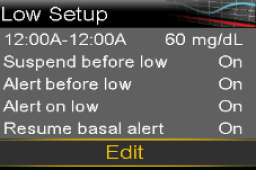
- Select and adjust the time segment.
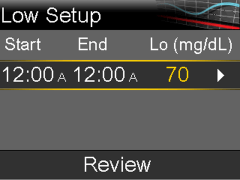
- Select any alert setting to make adjustments, or to turn the setting on or off.
- Select Next.
- Select Review.
- Review the low SG settings and select Save.