.png)


Delivering a Manual Bolus
Device: MiniMedTM 780G insulin pump
If the Bolus Wizard™ feature is turned off, the Manual Bolus screen appears when you select Bolus.
Please note that the bolus amounts shown below are for illustration purposes only. Your bolus amounts will be different.
To deliver a normal bolus using Manual Bolus feature:
- From the Home screen, press
 , then select
- Do one of the following:
- Select Bolus if the Bolus WizardTM feature is turned off.
- Select Bolus > Manual Bolus if the Bolus WizardTM feature is turned on.
The Manual Bolus screen appears. The Manual Bolus screen shows your current BG value, if applicable, and any insulin that is still active from previous boluses.
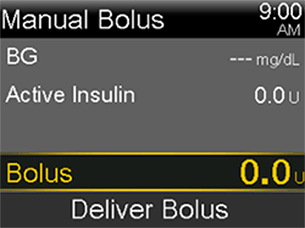
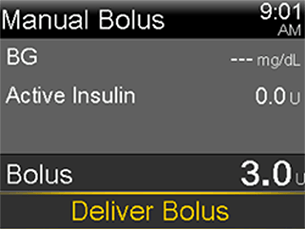
- Select Bolus and use the Up and Down arrows to set your delivery amount in units.
- Select Deliver Bolus to start the bolus.
Here's a tip: you can also access the Bolus screen by pressing the down arrow from the Home screen.