.png)


Entering recommended SmartGuardTM settings
Device: MiniMedTM 780G insulin pump
When using SmartGuardTM technology, the MiniMedTM 780G system allows you to choose between a 100, 110, or 120 mg/dL auto basal glucose target. The recommended SmartGuardTM auto basal target is 100 mg/dL for adults and 110 mg/dL for children < 15 years old (this may be lowered to 100 mg/dL if there is no concern with lows).
Additionally, because this system uses Active Insulin Time (AIT) differently, a setting of 2 hours is recommended, if appropriate. As always, make sure to work with your healthcare provider to ensure your settings are safe and meet your needs.
To change the SmartGuard target:
- From the Home screen, press Select.
- Select SmartGuard.

- Select SmartGuard Settings.
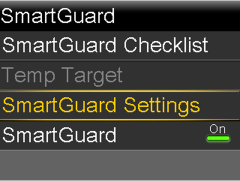
- Select Target and press Up or Down to enter the recommended SmartGuard target.
- Press Select
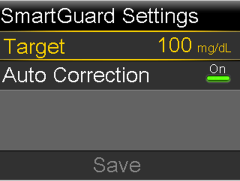
Note: The Auto correction feature is on by default.
- Select Save.
To change the Active Insulin Time:
- From the Home screen, press Select.
- Select Settings.
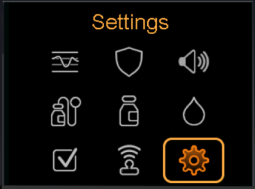
- Select Delivery Settings > Bolus Wizard Setup > Active Insulin Time.
- Select Duration and press Up or Down to enter the recommended Active Insulin Time of 2 hours.
- Press Select.
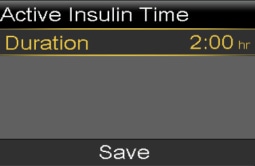
- Select Save.