.png)


Stopping a bolus delivery
Device: MiniMedTM 780G insulin pump
From time to time, you may need to stop a bolus delivery. We will review how to stop a bolus that is in progress. It does not stop your basal insulin delivery. If you need to stop all insulin delivery, use the Suspend All Delivery feature.
To stop a normal bolus delivery or the Now portion of a Dual Wave™ bolus delivery:
- From the Home screen, press

- Select
 then Stop Bolus, then select Yes to confirm.
The Bolus Stopped screen appears and shows the amount of bolus delivered, and the original bolus amount you set up.
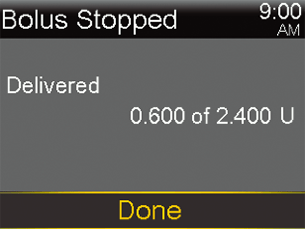
- Select Done.
Note: When a Dual WaveTM bolus is stopped during the Now portion, the Now portion is stopped and the Square portion is canceled.
To stop a Square WaveTM bolus delivery or the Square portion of a Dual WaveTM bolus delivery:
- While the pump is delivering the Square WaveTM bolus delivery or the Square portion of a Dual WaveTM bolus delivery, from the Home screen, press
- Select and then select Bolus.
- Select Stop Bolus, then select Yes to confirm.
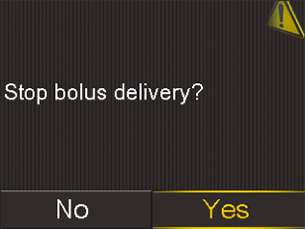
The Bolus Stopped screen appears and shows the amount of bolus delivered, and the original bolus amount you set up.
- Select Done.
To stop a Normal bolus delivery, the Now portion of a Dual Wave™ bolus delivery, the Square Wave™ bolus delivery or the Square portion of a Dual Wave™ bolus delivery using the Navigation Shortcuts:
- From the Home screen, select the Up arrow.
- Select Stop Bolus, then select Yes to confirm.
The Bolus Stopped screen appears and shows the amount of bolus delivered, and the original bolus amount you set up.
Here's a tip: You can also stop a bolus delivery via the Status screen by pressing the up arrow from the Home screen while a bolus is being delivered.