.png)


Setting Temp Target in SmartGuardTM technology
Device: MiniMedTM 780G insulin pump
Pump software version: 6.21, 6.42, and 6.61 (Find software version)
You can set a temporary sensor glucose (SG) target (Temp Target) of 150 mg/dL for situations when less insulin is needed, such as exercise. Check with your healthcare professional regarding the use of Temp Target.
Note: The Auto correction feature is not active during an active Temp Target. It will resume after the Temp Target is complete.
To set a Temp Target:
- From the Home screen, press
 and select
  .
. - Select Temp Target to turn the feature on or off.
- Use the Up and Down arrows to set the Duration, from 30 minutes to 24 hours, in 30-minute increments.
- Select Start.
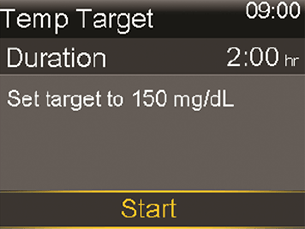
The screen shows Temp Target Started, and then changes to the Home screen, where a banner shows the remaining Temp Target time.
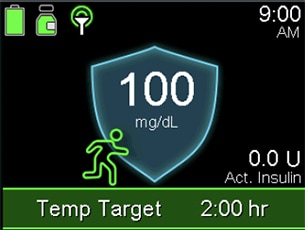
When the Temp Target time runs out, the banner disappears from the Home screen*.
* This is the SmarGuardTM feature home screen with Instinct sensor, made be Abbott, Simplera SyncTM sensor, and GuardianTM 4 sensor. If using the GuardianTM Sensor 3, your home screen may look slightly different.
To cancel Temp Target
- From the Home screen, press Menu select and select Menu shield .
- Select Cancel Temp Target.
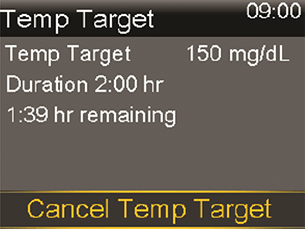
The Temp Target will be canceled, and the Home screen will appear, with no Temp Target banner.