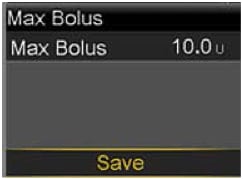
Changing your Max Bolus amount
Device: MiniMed™ 630G insulin pump (MMT-1715K)
The Max Bolus setting is the maximum amount of units of insulin your pump can deliver in a single bolus. This provides a safety measure by limiting the total amount of bolus insulin you can program for a single bolus.
To set or adjust your Max Bolus:
1. Press Menu.
2. Select Insulin Settings.
3. Select Max Basal/Bolus.
4. Select Max Bolus.
5. A screen will appear to ensure that you are entering a value that has been determined by you and your healthcare professional. If this change has been recommended by your healthcare professional, press right and select Continue.

6. Select Max Bolus.
7. Press up or down to enter the number of units and press Select.
8. Select Save.