.png)


How to turn off Remote Bolus settings
Follow the steps below to turn off Remote Bolus feature.
First, Select your pump:
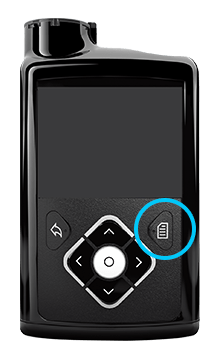
If your pump looks like this, you are using a
MiniMed™ 630G system.
This is my pump
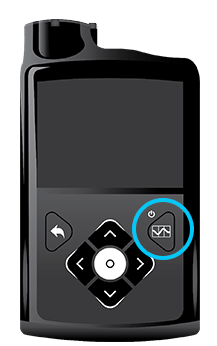
If your pump looks like this, you are using a
MiniMed™ 670G system.
MiniMed™ 670G Insulin Pump (MMT-1780, MMT-1781, MMT-1782)
Note: The Remote Bolus feature is not available when in SmartGuard™ Auto Mode
1. If Auto Mode is active, Auto mode must first be deactivated to enter Manual Mode using the following step:
Press Center Button ( ) and go to the Auto Mode settings screen.
Options > SmartGuard > Auto Mode

2. Select Save
3. In manual mode, Press Center Button () and go to the Remote Bolus screen.
Options > Utilities > Remote Bolus
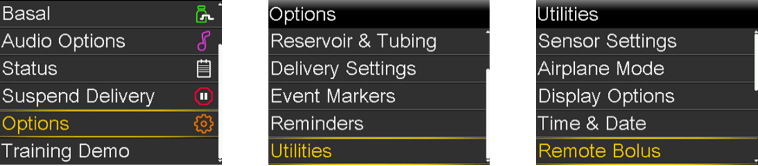
The Remote Bolus screen appears
4. Select Remote Bolus to turn the feature off.
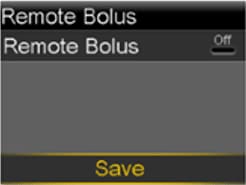
5. Select Save
If you wish to reactivate Auto Mode, go to the Auto Mode settings screen.
Options > SmartGuard > Auto Mode

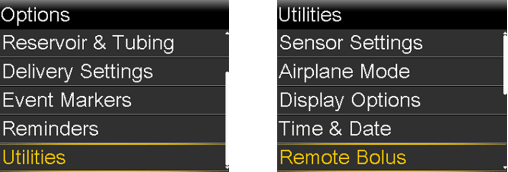
The Remote Bolus screen appears.
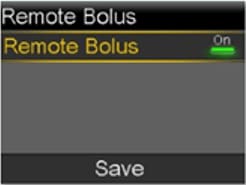
3. Select Save
4. Select Remote Bolus to turn the feature off
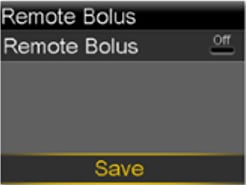
5. Select Save