.png)


Entering a BG value in SmartGuardTM technology
Device: MiniMedTM 780G insulin pump
Pump software version: 6.21, 6.42, and 6.61 (Find software version)
From time to time, you may need to enter a blood glucose (BG) value when the pump requires it to stay in the SmartGuardTM feature. There are two ways to enter a BG value when using the SmartGuardTM feature: manually entering a BG value or entering a BG value using the compatible Accu-Chek® Guide Link meter.
A BG can be manually entered via the SmartGuardTM bolus feature for ease of use, especially when a bolus is needed. If you are not using the SmartGuardTM bolus feature, the Blood Glucose screen lets you manually enter a BG value as well. When you access the Blood Glucose screen, it does not show any previously entered manual or linked meter BG values.
If a BG value is received from a linked meter, that value will immediately display in a separate BG meter screen and you will be prompted to confirm the BG value.
When you enter a BG while in the SmartGuardTM feature, a correction bolus may be suggested.
To manually enter BG readings:
- From the Home screen, press
 , then select
 .
. - Select Enter BG.
- Enter a BG value.
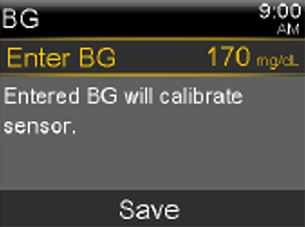
- Select Save.
The entered BG will also be used to calibrate the GuardianTM 4 sensor if between 50-400 mg/dL and the GuardianTM Sensor 3 if between 40-400 mg/dL.