.png)


Find your model number
Device: MiniMedTM 780G insulin pump
Pump software version: 6.21, 6.42, and 6.61 (Find software version)
You may need your pump model number if you call 24-Hour Technical Support. There are two places to find the model number of your insulin pump:
- On the status screen on your pump.
- In your Diabetes.shop account.
To find your model number on the status screen of your pump:
- From the Home screen, press Select.*
- Select Status.
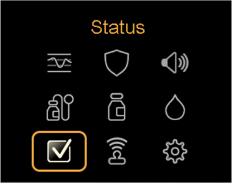
- Select Pump.
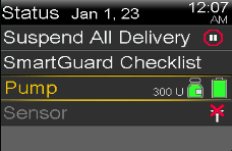
- Scroll down until you see “Model” followed by “MMT” and a series of numbers and/or letters.
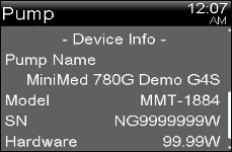
To find your model number in your Diabetes.shop account:
Your model number is located on your Devices webpage. Sign in to your Diabetes.shop account to access.
*Here’s a shortcut: Press the Up arrow from the Home screen to access the Status screen.