.png)


Setting up the SmartGuardTM feature
Device: MiniMedTM 780G insulin pump
The SmartGuard™ feature requires a 48-hour warm-up period before activation. This warm-up period begins at midnight after the pump starts delivering insulin and it does not require sensor use. During the warm-up period, the pump collects and processes data for use by the SmartGuard™ feature.
Once turned on, SmartGuard™ technology begins automatically when all conditions are met and a blood glucose (BG) is entered.
To turn the SmartGuard feature on or off:
- From the Home screen, press Select.
- Select SmartGuard.
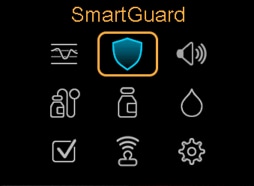
- Select SmartGuard to turn the feature on or off.
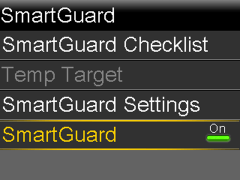
Note: Certain additional requirements must be met before the SmartGuard feature activates. See the SmartGuard Checklist for more information.
To confirm or change the SmartGuard settings:
- From the Home screen, press Select.
- Select SmartGuard.
- Select SmartGuard Settings.
- Select Target to adjust the SmartGuard target: 100 mg/dL (default), 110 mg/dL, or 120 mg/dL.
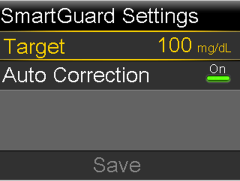
Note: The Auto correction feature is on by default.
- Select Save after making any changes.