.png)


SmartGuardTM bolus
Device: MiniMedTM 780G insulin pump
Pump software version: 6.21, 6.42, and 6.61 (Find software version)
When in SmartGuardTM technology, a current blood glucose (BG) or sensor glucose (SG) reading is used to determine the bolus amount. A carb amount can also be entered for a food bolus. The SmartGuardTM bolus feature then calculates the bolus amount needed to cover the meal, the correction, or both.
If the BG or SG is under 120 mg/dL, or if the bolus recommended is zero after the pump accounts for active insulin, or if the SmartGuardTM feature estimates that the current basal insulin delivery is enough, no correction is recommended.
Please note: A paired Accu-chek® Guide Link meter sends BG readings directly to the pump. If an Accu-chek® Guide Link meter is not used to check a BG, the BG value must be manually entered in the SmartGuardTM bolus screen.
To deliver a bolus with the SmartGuard™ feature:
- From the Home screen, press
 and select
  .
. - Select Bolus.
- Enter your Carb amount, in grams. The screen indicates the amount of the calculated bolus.
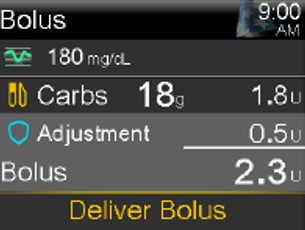
- Select Deliver Bolus.
A screen appears briefly to indicate the bolus delivery has started. Then, the Home screen* appears and shows the progress of the bolus delivery.
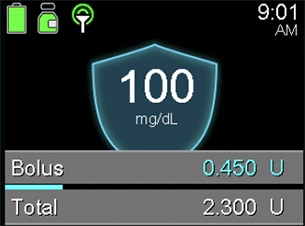
Here's a tip: You can also access the Bolus screen by pressing the down arrow from the Home screen.
*This is the SmarGuardTM feature Home screen with GuardianTM 4 sensor. If using the GuardianTM Sensor 3, your Home screen may look slightly different.