.png)


SmartGuard checklist
Device: MiniMed FlexTM insulin pump
The SmartGuardTM checklist screen shows you what’s needed to start or continue using SmartGuardTM mode. Once turned on, the SmartGuardTM checklist will appear in the SmartGuardTM settings menu. If you are exited to Manual mode, other indicators such as an Enter BG alert will direct next steps.
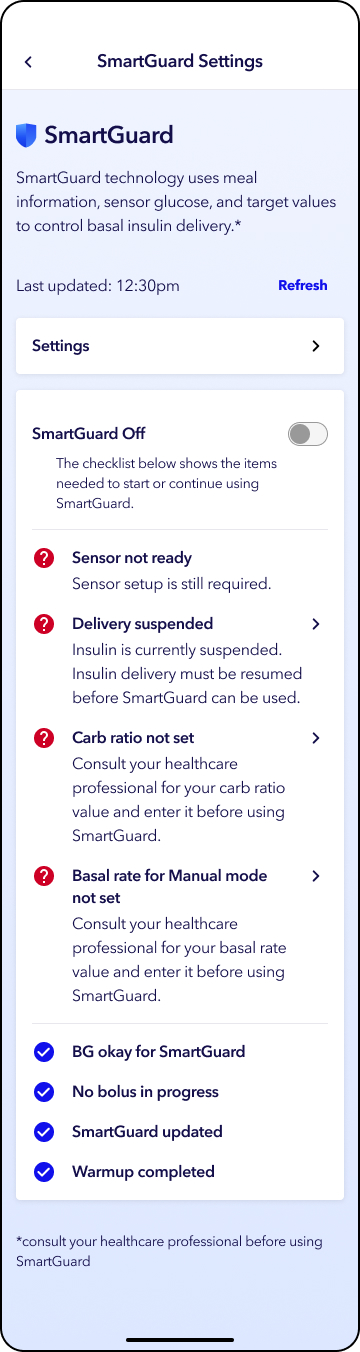
To use the SmartGuardTM checklist:
- From the home screen, tap Settings.
- Tap SmartGuardTM settings.
- Scroll down to see checklist
Checklist icons:
 Requirement not met
 Requirement met
The checklist items that are required to activate SmartGuardTM mode are:
- An acceptable blood glucose (BG) meter reading is entered.
- A sensor is paired and ready for use.
- There is not a bolus delivery in progress.
- Insulin delivery is not suspended.
- A carb ratio is set in the insulin settings.
- A basal pattern with at least one basal rate is set in the insulin settings.
- There is not a 5-hour active insulin update in progress.
- There is not a 48-hour SmartGuardTM warm-up in progress.