.png)


Sensor communication
The following is intended to provide you answers to the most commonly asked questions regarding GuardianTM transmitter communication. Should you still have questions or concerns, or if you prefer to talk to a MiniMed representative, call us at 1-800-646-4633. Our Technical Support team is available 24 hours a day to help troubleshoot and provide support.
If your continuous glucose monitor (CGM) and device lose communication with each other, you might experience an alert like Sensor signal not found, Lost sensor signal, or Possible signal interference. Here are a few of the reasons this might happen:
- The CGM transmitter isn’t compatible.
- The serial number is not entered in your device.
- The transmitter was not fully charged.
- Other devices, like consumer electronics, are nearby and temporarily interrupting signals.
- You’re taking part in an activity (like swimming) and have created distance between your devices, or your transmitter is submerged underwater.*
There are a few simple things that might help. The first step is to make sure your devices remain within 6 feet of each other, and then move other consumer electronics at least 12 feet away from you. Once this has been done, it can take up to 15 minutes to re-establish communication.
Expand each question until you've reached a possible solution.
1. Have you used this transmitter for more than a year?
Yes, it’s been longer than a year.


Yes, it’s been longer than a year.
While you can answer the remaining questions, it may be time to consider getting a new transmitter. Order a new transmitter online or give us a call at 1-800-646-4633 (Monday - Friday, 8:00 a.m. to 7:00 p.m. CT).
No, it hasn’t had its first ‘birthday’ yet.
No, it hasn’t had its first ‘birthday’ yet.
Great! Please continue answering the questions below for other possible reasons.
2. What kind of device do you use?
MiniMedTM 700-series insulin pump system
MiniMedTM 700-series insulin pump system
Now, let’s make sure your transmitter is fully compatible with your pump:
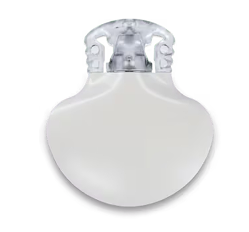
GuardianTM 4 sensor is compatible with the Guardian™ transmitter (its upper side has no printing on it).
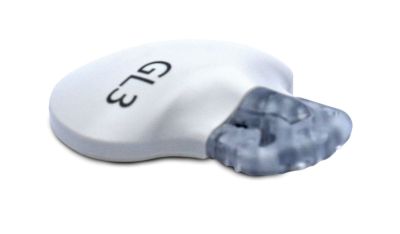
GuardianTM sensor is compatible with a Guardian™ Link 3 transmitter (its upper side is labeled with the letters “GL3”).
Once you confirm you’re using the right transmitter, check to see if the CGM serial number that’s programmed into the pump matches the number on your actual serial number. Here are two ways to confirm:
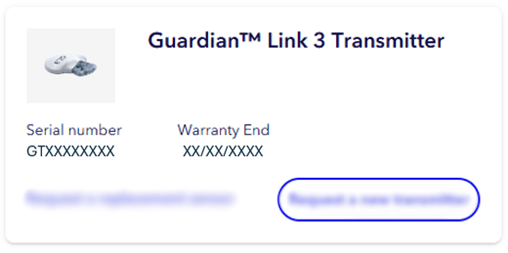
If currently wearing the transmitter, then sign in to your Diabetes.shop account to view the serial number on your transmitter in the current list of devices.
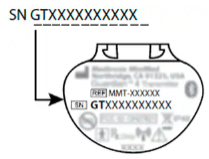
Not wearing your transmitter? Flip the transmitter on to the flat side and look for the serial number, a combination of letters and numbers following “SN.” Press  , then select
  .
.
MiniMedTM 600-series insulin pump system
MiniMedTM 600-series insulin pump system
First, make sure that your transmitter is compatible with your pump. When using a MiniMed™ 670G system or MiniMed™ 630G system, you should be using the Guardian™ Link 3 transmitter. (It has the letter “G” on the transmitter.)
Guardian™ sensor is compatible with a Guardian™ Link 3 transmitter (its upper side is labeled with the letters “GL3”).
Once you confirm you’re using the right transmitter, check to see if the CGM serial number that’s programmed into the pump matches the number on your actual serial number. Here are two ways to confirm:
If currently wearing the transmitter, then sign in to your Diabetes.shop account to view the serial number on your transmitter in the current list of devices.
If you’re using the right transmitter, let’s make sure the transmitter ID is programmed into the pump’s Manage Device screen. Press and navigate to Options > Utilities > Device Options > Manage Devices.
GuardianTM Connect
GuardianTM Connect
First, make sure that your transmitter is compatible with your pump. When using the Guardian™ Connect system, you should be using the Guardian™ Link 3 transmitter. (It has the letter “G” on the transmitter.)
Guardian™ sensor is compatible with a Guardian™ Link 3 transmitter (its upper side is labeled with the letters “GL3”).
3. Does the CGM serial number on your pump screen match “SN” on the back of your transmitter?
Yes, they’re the same!
Yes, they’re the same!
Sounds good. Please proceed to question 4.
No, the number is missing, or is different from the one stored in my pump.
No, the number is missing, or is different from the one stored in my pump.
Since you can never simultaneously pair more than one transmitter, make sure you have the right details entered. If your battery was removed for an extended period or completely depleted, having a missing ID is expected. Once paired, your sensor connection should be restored. For more tips, feel free to continue answering the questions below.
Follow these steps on how to pair your pump and transmitter.
4. Now, let’s make sure you’re powered up. Has your transmitter been fully charged?
Yes, it’s charged!
Yes, it’s charged!
Perfect. Please proceed to question 5.
No, it isn’t charged.
No, it isn’t charged.
Always charge the transmitter before inserting the sensor. A depleted transmitter does not function. A fully charged transmitter works at least seven days without recharging. A depleted transmitter can take up to two hours to recharge. Here’s how to charge your transmitter:
- Push the transmitter and the charger together to connect the transmitter to the charger.
- Within 10 seconds after the transmitter is connected, a green light on the charger will flash for one to two seconds as the charger powers on.
- For the rest of the charging time, the green light on the charger will continue to flash in a pattern of four flashes with a pause between the four flashes.
- When charging is complete, the green light on the charger will stay on, without flashing, for 15 to 20 seconds and then turn off.
- After the green charger light turns off, disconnect the transmitter from the charger. The green light on the transmitter starts to flash.
For more tips on charging your transmitter, check out this handy guide and always call 24-Hour Technical Support at 1-800-646-4633 if you have any additional concerns about charging.
If you need a spare charger, you can purchase one on Diabetes.shop.
5. Does your transmitter appear to have any damage to the outside shell or connector pins?
It appears to be damaged.
It appears to be damaged.
If the connector pins are damaged or corroded, the transmitter cannot communicate. It is probably time to replace your transmitter. Call us to discuss this 24/7 at 1-800-646-4633.
Everything looks okay.
Everything looks okay.
We hope this was helpful for you. To summarize:
- Make sure your transmitter is compatible, and the serial number is entered.
- Move your pump and transmitter within 6 feet of each other (for example, worn on the same side of your body.)
Tip: If you’re doing an activity like swimming where you plan to disconnect your pump, take small breaks so devices have a chance to connect while you’re out of the water.* - Consider other electronics that could be temporarily causing interference and then move 12 feet away from them.
- Use a transmitter that’s within the one-year warranty for the best performance.
If you have completed this questionnaire and still have questions or concerns, call us at 1-800-646-4633. Our Technical Support team is available 24 hours a day to help troubleshoot and provide support.
I can't check now since I'm wearing it but will check before my next sensor change.
I can't check now since I'm wearing it but will check before my next sensor change.
We hope this was helpful for you. To summarize:
- Make sure your transmitter is compatible, and the serial number is entered.
- Move your pump and transmitter within 6 feet of each other (for example, worn on the same side of your body.)
Tip: If you’re doing an activity like swimming where you plan to disconnect your pump, take small breaks so devices have a chance to connect while you’re out of the water.* - Consider other electronics that could be temporarily causing interference and then move 12 feet away from them.
- Use a transmitter that’s within the one-year warranty for the best performance.
If you have completed this questionnaire and still have questions or concerns, call us at 1-800-646-4633. Our Technical Support team is available 24 hours a day to help troubleshoot and provide support.
*At the time of manufacture and when the reservoir and tubing are properly inserted, your pump is waterproof. It is protected against the effects of being underwater to depth of up to 12 feet (3.6 meters) for up to 24 hours. This is classified as IPX8 rating. See user guide for more details. The sensor and transmitter are water-resistant at 8 feet (2.4 meters) for up to 30 minutes. CGM readings may not be transmitted from the CGM to the pump while in water.