.png)


MiniMed™ 630G system FAQ's
Need help? click a topic below.
Pump


How do I take care of my pump?


How do I take care of my pump?
These daily tips can help you take care of your insulin pump so it takes care of you!
1. Keep it secure: If your pump touches your skin, turn the buttons away from your body to reduce long term moisture exposure. Consider a waist pouch while exercising.
2. Soft button pushing: When pushing the buttons on your pump, use the side or pad of your finger. Try to avoid sharp objects like keys or the tips of long or acrylic fingernails.
How do I set a temporary basal rate?
How do I set a temporary basal rate?
The Temporary Basal Rate feature lets you immediately increase or decrease your basal insulin for the period of time (duration) that you set. It is often used for exercise and sick days. A Temp Basal can be set in either Percent (delivers a percent of the current basal rate) or by Rate (delivers the amount that you enter). Follow these pump screen instructions.
How do I deliver a bolus?
How do I deliver a bolus?
To learn about how to use the Bolus Wizard™ calculator and advanced bolus options like the Dual Wave™ and Square Wave™ feature, refer to this Getting Started Guide.
What are some of the most common alerts?
What are some of the most common alerts?
Here's a list of pumps alarms, alerts and messages and how to handle each one.
How do I insert my Quick-set™ infusion set?
How do I insert my Quick-set™ infusion set?
Refer to this Quick-set™ Infusion Set Quick Reference Guide or How to Insert Your Quick-set™ video. For other infusion set references, go to the Infusion Sets section on the MinMed™ 630G support page.
How do I replace my pump clip?
How do I replace my pump clip?
If your pump clip breaks, you can request a replacement at no charge online by logging into your account. Limitations apply.
CGM
What is Suspend on low?
What is Suspend on low?
Suspend on low is a feature that is used in conjunction with continuous glucose monitoring (CGM). If the feature is turned on, the pump automatically suspends insulin infusion for up to 2 hours when glucose levels reach a pre-determined threshold. After 2 hours, the pump resumes basal insulin delivery. If blood glucose (BG) is still low 4 hours after resuming basal, insulin delivery re-suspends.
How does the Suspend on low feature work?
How does the Suspend on low feature work?
When Suspend on low occurs, all insulin delivery is stopped immediately. Your pump alarms and the screen displays an alarm message. Insulin will remain suspended. If the Suspend on low alarm is not cleared after 2 minutes:
- the pump will begin to siren
- this emergency message will appear on the pump screen
This will continue until the alarm is cleared.
If you clear the alarm within 2 hours:
- insulin will stay suspended for a maximum of 2 hours unless you manually resume insulin delivery
- basal insulin will then resume and will not suspend again for the duration of time determined by your Low Snooze setting
- after this time has passed, insulin will then be suspended again if sensor glucose is at or below the low limit
If you do not clear the alarm:
- insulin delivery will remain suspended for 2 hours
- basal insulin will then resume automatically and will not suspend again for 4 hours regardless of your sensor glucose value
- if you clear the alarm during the 4-hour period, the time before insulin can be suspended again will be reduced to equal the duration of your Low Snooze setting
How is basal delivery resumed after Suspend on low occurs?
How is basal delivery resumed after Suspend on low occurs?
There are two ways insulin can be restarted when Suspend on low occurs: automatic and manual resume.
Automatic: Basal insulin will automatically resume if insulin has been suspended for the maximum of 2 hours. You will always receive a Basal delivery resumed alert when this occurs.
NOTE: Any bolus that was delivering at the time the Suspend on low occurred will not restart. The basal pattern active at the time the Suspend on low occurred will restart. If a Temp Basal was active at the time of the suspend, the Temp Basal will not resume if the Suspend on low alarm was not cleared. If the Suspend on low alarm was cleared, the Temp Basal will resume if there is still time remaining.
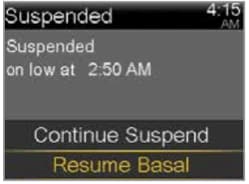
Manual: There may be times when you choose to resume basal insulin delivery yourself. You can simply take these steps to manually resume basal insulin delivery:1) Select Suspended on low. 2) Press Resume Basal. 3) Press Yes to confirm.
NOTE: Any bolus that was delivering at the time the Suspend on low occurred will not restart. The basal pattern active at the time the Suspend on low occurred will restart. If a Temp Basal was active at the time of the suspend, the Temp Basal will not resume if the Suspend on low alarm was not cleared. If the Suspend on low alarm was cleared, the Temp Basal will resume if there is still time remaining.
What should I know about calibrating?
What should I know about calibrating?
- Try not to calibrate with multiple blood glucose (BG) meters. It's best to stick with the same meter for all your calibrations.
- We recommend calibrating 3-4 times a day.
- Wash your hands before checking your BG.
- Enter the BG reading into the pump right away. Don't use old meter BG readings or previous sensor readings as a calibration.
- If your system requires a new calibration, wait at least 15 minutes between calibration entries.
When should I calibrate?
When should I calibrate?
You should calibrate when your glucose levels are stable. Exercise and eating can cause rapid changes in your glucose levels. That’s why many people choose to calibrate before meals and before bedtime.
How do I use the Calibration Reminder feature?
How do I use the Calibration Reminder feature?
How do I use the Calibration Reminder feature?
You can use the Calibration Reminder to give you notice before the next calibration is necessary. For example, if you calibrated at 7:00 a.m. your next calibration would be due at 7:00 p.m. (12 hours later). If your reminder is set for 1 hour, you would receive a Calibration Reminder at 6:00 p.m. which is 1 hour before the calibration is due. This can help ensure you calibrate 3-4 times a day. The Calibration Reminder defaults On with a reminder time of 1:00 hour.
To change the Calibration Reminder:
- Go to: Main Menu > Options > Reminders > Calibration
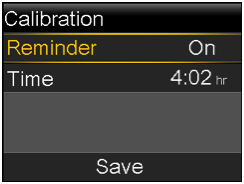
- Select Reminder to turn the reminder on or off.
- If you turn on the reminder, select Time and enter a time between 5 minutes and 6 hours.
- Select Save.
How do I silence my CGM alerts?
How do I silence my CGM alerts?
Your pump has a feature called Alert Silence, where you can temporarily silence your alerts. To use the Alert Silence feature:
- Go to: Main Menu > Audio Options > Alert Silence Options
- Select All Sensor Alerts or your desired alerts
- Select the Duration (time) you want
- Select Begin
Don't worry, you will still get important low alerts if Alert Silence is ON. For your safety, Low SG (50 mg/dL or below) will always sound, and Alert on Low will sound if turned on.
You can cancel the Alert Silence feature at any time:
- Go to: Main Menu > Audio Options > Alert Silence
- Select Cancel Alert Silence
How do I change my alert settings?
How do I change my alert settings?
Alerts with the system are customizable. You can adjust your low, high, and calibration alert settings. Be sure to work with your healthcare provider who can help you determine how to optimize your settings.
Learn more on changing your low settings.
Learn more on changing your high settings.
What are some of the most common alerts for CGM?
What are some of the most common alerts for CGM?
Check out Sensor Alerts for the most common alerts, reason they occur, and steps to take.
Where should I insert my glucose sensor?
Where should I insert my glucose sensor?
The MiniMed™ 630G system uses the Guardian™ Sensor 3 and can be worn on the abdomen. Watch this video for help.
What's the best way to tape my sensor and transmitter?
What's the best way to tape my sensor and transmitter?
We have a recommended method for taping that we have found is effective for most people who wear CGM. It requires you to use two pieces of oval tape that are supplied with your sensor. Some people also use an additional layer of tape called overtape. Watch this video on how to tape and use extra adhesives. For more information on tape tips and site management, click here.
Where can I purchase or try out additional adhesive or tape options?
Where can I purchase or try out additional adhesive or tape options?
You can purchase adhesives and tapes at www.Diabetes.shop or through the product manufacturer’s website – a full list of product recommendations can be found here.
Contact 24-Hour Technical Support at 1-800-646-4633 option 1 for technical assistance or to report product issues. They can also provide a sample kit with various tapes and adhesives.
How do I request a replacement sensor?
How do I request a replacement sensor?
Please sign in to your online account to complete the sensor replacement form. (We recommend getting your sensor lot number ready before you begin the process.)
CareLink™ Software
How do I create a CareLink™ account?
How do I create a CareLink™ account?
Even if you have an online MiniMed account, a unique login is needed for CareLink™ software. Learn how to create a CareLink™ account.
How do I set up my computer to upload my insulin pump?
How do I set up my computer to upload my insulin pump?
The CareLink™ uploader allows you to upload the information in your pump or meter to the CareLink™ website. Learn how to set up CareLink™ on your computer.
How do I upload my insulin pump?
How do I upload my insulin pump?
Check out this video for easy steps for your first or next pump upload.
Lifestyle
What should I pack?
What should I pack?
Pack extras of everything– insulin, infusion sets, sensors, reservoirs, alcohol swabs, sensor tape, extra compatible batteries for your pump, and even syringes in cases of emergency. The mentality is, “it’s better to have more of what you need, than not enough.” Check out our full travel checklist here.
How should I handle airport security?
How should I handle airport security?
The TSA allows for diabetes-related supplies, equipment and medication—including liquids—through the checkpoint once they have been properly screened by X-ray or hand inspection.
If possible, pack all your supplies together in your carry-on bag so you have everything on hand. Before your screening begins, inform the officer conducting the screening about any supplies on you or in your carry-on.
Read more about flying with your diabetes supplies at how-to pass-through security before boarding your flight.
What is the Travel Loaner Program?
What is the Travel Loaner Program?
The Travel Loaner Program allows US-based customers to take a "back-up" insulin pump for a $50 fee every 90 days. Take a "back-up" pump when you:
- Go on a cruise
- Travel to Hawaii or Alaska
- Travel internationally
Complete the Travel Loaner form and submit it at least 2 weeks prior to your trip to ensure on-time delivery. A signature is required upon delivery and you will need to return the travel loaner when you arrive back home.
It is important that you check your blood glucose (BG) more frequently while you are traveling. The routine hassle of travel, including stress, changes in time zones, schedules and activity levels, meal times and types of food, can all affect your diabetes control. Be extra attentive to monitoring your BG frequently and be prepared to respond if needed.
Note: The Travel Loaner Program only includes insulin pumps and does not include blood glucose meters or CGM devices.
Other Assistance
How do I order supplies?
How do I order supplies?
We recommend ordering when you open your last box of sensors or infusion sets. To order supplies, you have three options:
- Sign up for Scheduled Orders or place your one-time order at www.Diabetes.shop.
- Text SUPPLY to 22094 to start the order process.
- Call us between 8 a.m. — 6 p.m. CT Monday — Friday at 1-800-646-4633, option 2.
If you order sensors through a distributor, you'll need to contact them directly to place your next order.
Can I get help with my bill?
Can I get help with my bill?
For all things finances, from how to pay your bill to options for financial assistance, visit this page.
Where can I go for more help with my device?
Where can I go for more help with my device?
Visit the Support section for more answers to frequently asked questions, or call our 24-Hour Technical Support team at 1-800-646-4633, option 1.
MiniMedTM 630G system with SmartGuardTM technology
Indicated for the continuous delivery of insulin, at set and variable rates, for the management of diabetes mellitus. MiniMedTM 630G system is approved for ages 14 years or older with GuardianTM Sensor 3 and MiniMedTM 630G system is approved for ages 16 years or older with EnliteTM sensor. Both systems require a prescription. Insulin infusion pumps and associated components of insulin infusion systems are limited to sale by or on the order of a physician and should only be used under the direction of a healthcare professional familiar with the risks of insulin pump therapy. Pump therapy is not recommended for people who are unwilling or unable to perform a minimum of four blood glucose tests per day. Pump therapy is not recommended for people who are unwilling or unable to maintain contact with their healthcare professional. Pump therapy is not recommended for people whose vision or hearing does not allow recognition of pump signals and alarms.
Insulin pumps use rapid-acting insulin. If your insulin delivery is interrupted for any reason, you must be prepared to replace the missed insulin immediately. Replace the infusion set every 48–72 hours, or more frequently per your healthcare professional’s instructions.
Insertion of a glucose sensor may cause bleeding or irritation at the insertion site. Consult a physician immediately if you experience significant pain or if you suspect that the site is infected.
The information provided by CGM systems is intended to supplement, not replace, blood glucose information obtained using a blood glucose meter. A confirmatory fingerstick using a CONTOUR®NEXT LINK 2.4 meter is required prior to making adjustments to diabetes therapy. Always check the pump display when using a CONTOUR®NEXT LINK 2.4 meter, to ensure the glucose result shown agrees with the glucose results shown on the meter. Do not calibrate your CGM device or calculate a bolus using a result taken from an Alternative Site (palm) or a result from a control solution test. If a control solution test is out of range, please note that the result may be transmitted to your pump when in the “Always” send mode. It is not recommended to calibrate your CGM device when sensor or blood glucose values are changing rapidly, e.g., following a meal or physical exercise.
The MiniMedTM 630G system is not intended to be used directly for preventing or treating hypoglycemia but to suspend insulin delivery when the user is unable to respond to the Suspend on low alarm and take measures to prevent or treat hypoglycemia themselves. Therapy to prevent or treat hypoglycemia should be administered according to the recommendations of the user’s healthcare provider.
WARNING: The SmartGuardTM Suspend on low feature will cause the pump to temporarily suspend insulin delivery for two hours when the sensor glucose reaches a set threshold. Under some conditions of use the pump can suspend again, resulting in very limited insulin delivery. Prolonged suspension can increase the risk of serious hyperglycemia, ketosis, and ketoacidosis. Before using the SmartGuardTM feature, it is important to read the SmartGuardTM feature information in the User Guide and discuss proper use of the feature with your healthcare provider.
For complete details of the system, including user guides and important safety information such as indications, contraindications, warnings and precautions associated with system and its components, see https://link.minimed.com/Risks.