.png)


Instinct sensor support and resources
Select the topic that fits your support needs:
 | The MiniMedTM Mobile app is required to start the Instinct sensor† with a compatible MiniMedTM 780G pump. For help setting up the app, visit our app support. The App Manager CGM Receiver, with the MiniMed Mobile app pre-installed, may also be used to start the Instinct sensor. |
Know your sensor life
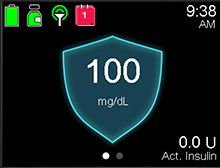
The Instinct sensor lasts up to 15 days.
Sensor Life Icon
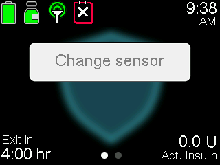
When 1 day of sensor life remains, a red icon with a 1 appears on the Home screen. 
When the sensor expires, you will see the icon turn solid black with an ‘x'. 
You can always see how many days of sensor life remain by viewing your Status screen.
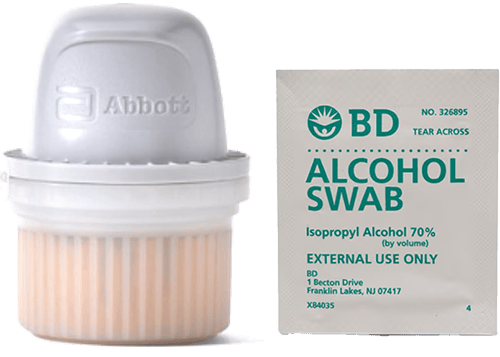
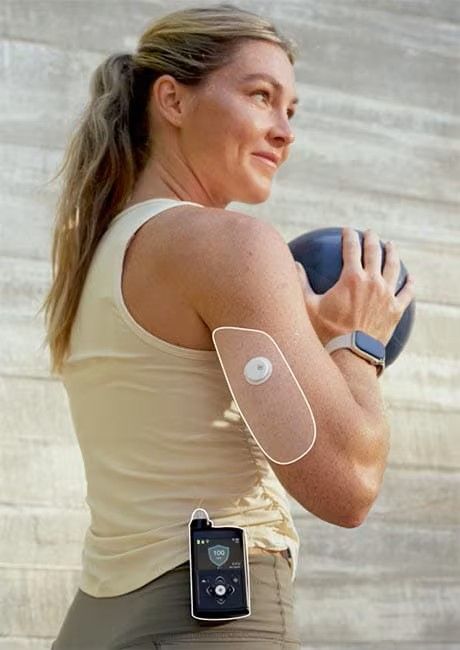
The Instinct sensor is indicated for wear only on back of upper arm for ages 7 and older when used with the MiniMedTM 780G system
For best connection, wear your pump and Instinct sensor on the same side of your body. Your infusion set can be worn on either side.
Avoid scars, moles, stretch marks, or lumps. Pick a flat site that doesn’t bend and keep at least 1 inch from insulin injection sites.
Getting started with the Instinct Sensor
Watch this video for starting and applying your sensor on the back of your arm.
The MiniMed™ Mobile app must be used to pair the mobile device to the pump before you can start a new sensor. Once started, the sensor communicates with the pump through a wireless connection. Only one sensor can be paired with the pump.
Note: When you start a new sensor with the app, the existing sensor is automatically unpaired from the pump. If the sensor is unintentionally unpaired, return to the MiniMed Mobile app to restart the sensor.
To start the sensor:
1. Tap the MiniMed Mobile app icon from your compatible device.
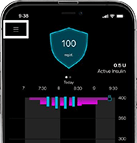
2. Tap the Menu button to open the menu.
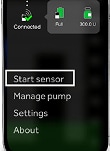
3. Tap Start Sensor.
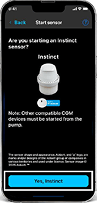
4. Confirm you want to start the Instinct sensor by tapping Yes, Instinct.
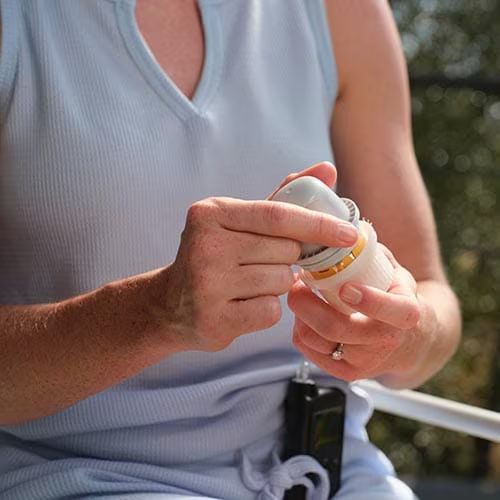
1. Prep the skin. Wash with plain soap, dry, clean with alcohol wipe, then let dry.

2. Prepare the sensor. Unscrew the cap from the Sensor Applicator.
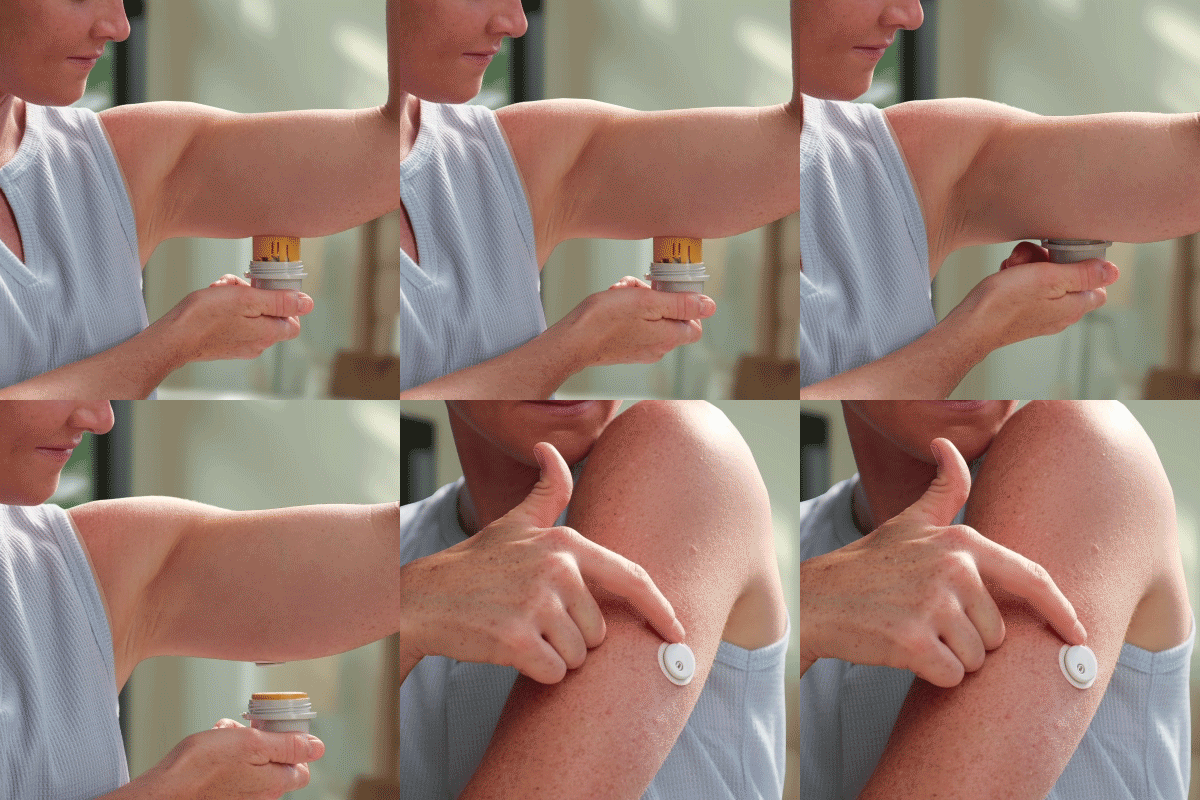
3. Apply the sensor. Push down firmly to apply sensor, then gently pull Sensor applicator away from body. Make sure sensor is secure.
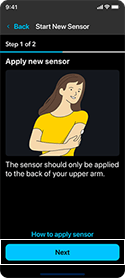
2. When scanning a new sensor, your pump must be on the Home screen with no active alerts or alarms. Next, on your device, tap Scan new sensor. If you are using an iOS device, hold the top of your device near your sensor. If you are using an Android device, hold the back of your device near your sensor.
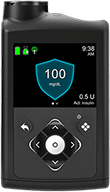
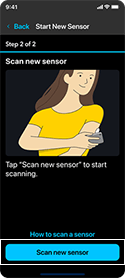
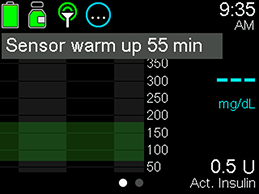
Once you hear the beep or feel the vibration, your Instinct sensor will begin to pair with your MiniMed 780G insulin pump and the 1-hour warm-up begins. The Sensor warm up X:XX min message appears on the pump Home screen until the sensor warm up is complete. After the warm-up is complete, the pump begins receiving SG readings.
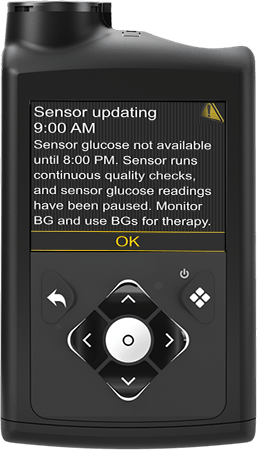
Sensor updating alert
What does it mean?
The Instinct sensor constantly monitors the health of the sensor to ensure it's reliable for use. Since the system is free of calibrations, additional safety checks have been put into place. As a result, the Sensor Updating alert may occur when the system is confirming the reliability of the sensor.
What action should you take if Sensor updating occurs?
There is no need to take action unless recommended by the system. The system is designed to keep you in SmartGuardTM. Follow on-screen instructions if action is needed.
Have you had the alert for more than 3 hours?
In the event that the updating lasts for more than 3 hours, consider changing the sensor to maximize time in SmartGuard technology.‡
Frequently asked questions


To scan your sensor, make sure you're using a compatible device and the appropriate app. You can either use your personal compatible smartphone or an App Manager CGM Reciever from Minimed. For a list of copmatible devices and app details, visit this page.
- If using the MiniMedTM 780G system, the MiniMedTM Mobile app is required to start and scan the sensor on a compatible device. The pump should be on the home screen with no active alerts, or bolus delivery before scanning.
- If you are using the MiniMedTM Go system, the MiniMedTM Go app is required to start and scan the sensor on a compatible device.
- If using another MiniMed insulin pump system, the MiniMed app is required to start and scan on a compatible device.
Can I wear my Instinct sensor somewhere other than the back of the upper arm?
Can I wear my Instinct sensor somewhere other than the back of the upper arm?
The Instinct sensor is indicated for wear on the back of the upper arm. Wearing the sensor in other locations has not been evaluated and may affect performance.
Why does my sensor graph look different?
Why does my sensor graph look different?
The Instinct sensor sends glucose updates more often than other sensors. If you’ve used another sensor before, you may notice that your sensor graph looks bumpier and less smooth. You may also see more trend arrows. There’s no need to worry! These changes in how the data looks do not change how SmartGuard works or gives you insulin. SmartGuard still works the same to automatically adjust your insulin and help keep your glucose levels on track.
Why am I seeing gaps or dotted lines in my sensor glucose (SG) readings?
Why am I seeing gaps or dotted lines in my sensor glucose (SG) readings?
Gaps or dotted lines in your SG graph usually mean your sensor and pump briefly lost their wireless connection. Both devices are designed to reconnect automatically, and short interruptions do not disrupt your therapy.
SmartGuard technology is designed to operate safely, even if communication between your pump and sensor is temporarily interrupted.
If the pump and sensor are disconnected for 30 minutes or longer, your pump will alert you with a Lost Sensor alert. When the connection is restored, any SG data collected during the interruption will appear on your graph as a dotted line.
What do I do if my pump notifies me that my Instinct sensor failed to pair?
What do I do if my pump notifies me that my Instinct sensor failed to pair?
This notification means that the sensor couldn't pair due to a connection issue. When this happens, use the MiniMedTM Mobile app to restart the sensor. If the alert happens again, don't remove the sensor. Call 1-800-646-4633, option 1 support.
What do I do if my pump notifies me that my Instinct sensor failed to start?
What do I do if my pump notifies me that my Instinct sensor failed to start?
When this happens, use the MiniMedTM Mobile app to restart the sensor. If the alert happens again, don't remove the sensor. Call 1-800-646-4633, option 1 support.
My sensor won't scan. What do I do?
My sensor won't scan. What do I do?
Here are a few helpful tips to remember when scanning a new Instinct sensor:
Ensure NFC (near field communication) is turned on in your mobile device. This feature is used to pair your sensor to your pump. For iPhone users, the NFC antenna is always on. For Android/App Manager CGM Receiver C users, while NFC is often on by default, be sure that it is toggled on. You can do this by opening the settings menu and search for NFC in the search bar and toggle on.†
Where and how you hold your phone matters. While scanning, make sure you don’t touch any buttons on the phone or the screen. Move your phone around slowly as needed to find the best position — proximity, orientation, and other factors can affect performance. (For example, a bulky or metallic case can interfere so remove the case before scanning.) For iPhone users, the antenna will be at the top of the phone. For Android users: NFC location varies by phone model. Check your phone’s online user guide. If the guide isn’t clear, follow the steps on the back to find the scanning spot.
You can also turn your phone off and back on and try scanning again. If you’re still having trouble, we recommend you try turning NFC off and back on. Instructions vary based on your phone, but they should be located where you find your Wi-Fi and Bluetooth settings.
† Directions above vary depending upon device. Check your mobile device's online user guide for more info.
Why do I keep losing the connection between my sensor and pump?
Why do I keep losing the connection between my sensor and pump?
Sensor connection may be interrupted if the pump and sensor are not positioned to communicate clearly with each other.
For best connection:
- Wear your pump and sensor on the same side of your body. Your infusion set can be worn on either side of the body.
- Keep the pump and sensor within line of sight, with as little obstruction as possible. Clothing or body positioning can sometimes interfere with communication.
Positioning the pump and sensor so they can “see” each other helps them communicate and share real-time information.
What can I do to help reconnect my sensor and pump?
What can I do to help reconnect my sensor and pump?
If your sensor disconnects from your pump:
- Move the pump closer to the sensor.
- Wear the pump on the same side of your body as the sensor, ideally with a clear line of sight.
- Avoid having your body or objects between the pump and sensor.
- Separate your pump and sensor from other wireless devices that may cause interference or turn off interfering devices if possible.
These steps can help minimize future connection interruptions.
If you have additional concerns about your connectivity, please contact MiniMed for support at 1-800-646-4633, option 1.
What are tips to help my sensor stick?
What are tips to help my sensor stick?
Before insertion, the application area needs to be completely dry and should be free of soap, lotion, shampoo or conditioner. Consider shaving the application area, then make sure it’s completely dry. And if you lead an active lifestyle, select a sensor site on the back of your upper arm that minimizes the risk of the sensor being knocked off.
Once you’re wearing it, be careful not to catch it on objects (like a doorway) and try not to play with, pull, or frequently touch the sensor. Be careful during everyday activities like undressing so that it doesn’t catch on undergarments. And after a shower or swim,§ take extra care when toweling off and pat it dry. For more helpful tips, check out the sensor adhesion guide.
§ At the time of manufacture and when the reservoir and tubing are properly inserted, your pump is waterproof. It is protected against the effects of being underwater to a depth of up to 12 feet (3.6 meters) for up to 24 hours. This is classified as IPX8 rating. See user guide for more details. Do not take your Instinct sensor deeper than 3 feet (1 meter) or immerse it longer than 30 minutes in water. CGM readings may not be transmitted from the CGM to the pump while in water.
Can I use tape to add extra stickiness?
Can I use tape to add extra stickiness?
Overtape isn’t required. If you prefer to use overtape, the opening/hole in the center of the sensor must not be covered. Do not remove the overtape once applied until the sensor is ready to be removed. Shop for tapes and prep wipes.
What should I do if my sensor falls off?
What should I do if my sensor falls off?
Request a replacement online or call 1-800-646-4633 option 1.
How can I get a replacement?
How can I get a replacement?
There are two ways to request an Instinct sensor replacement:
- Online through Diabetes.shop. Once logged in, the system will take you through the steps to request your replacement.
- By phone by contacting MiniMed customer support at 1-800-646-4633, option 1. The support team will ask a few questions about the issue and guide you through the next steps.
Can I use the Instinct sensor if I have a pacemaker?
Can I use the Instinct sensor if I have a pacemaker?
No, performance of the sensor when used with other implanted medical devices, such as pacemakers, has not been evaluated.
Can I keep my Instinct sensor on during a CT scan and X-rays?
Can I keep my Instinct sensor on during a CT scan and X-rays?
Yes. Instinct sensors are the only¥ CGM sensors that can be safely worn during CT scans and X-rays with no impact to readings.
¥ Among patient-applied sensors.
Can I wear my Instinct sensor going through airport security machines?
Can I wear my Instinct sensor going through airport security machines?
Instinct sensors can be exposed to common electrostatic (ESD) and electromagnetic interference (EMI), including airport metal detectors. However, some airport full-body scanners include millimeter radio-wave, which you cannot expose your sensor to. The extent of these scanners has not been evaluated, and the exposure may damage the sensor or cause inaccurate results. To avoid removing your sensor, you may request another type of screening. If you do choose to go through a full-body scanner, you must remove your sensor. If in doubt about the type of security scan you are passing through, notify the Security Officer prior to proceeding through the airport security checkpoint.
Can Instinct be worn during an MRI scan?
Can Instinct be worn during an MRI scan?
You can safely have a 1.5T or 3T MRI exam while wearing your sensor if you follow the instructions in the sensor insert that came in the box with your sensor. Refer to the sensor insert for more details.
Important safety information: Not following these instructions could cause injury. Leave your connected devices outside of the exam room. Sensor readings may not be accurate during the MRI. The sensor will start working normally again within 1 hour after the scan.
Can I calibrate my Instinct sensor?
Can I calibrate my Instinct sensor?
No, the Instinct sensor is factory calibrated and does not require or allow user calibration. When you enter a blood glucose (BG) value into your MiniMed system, it is not used to calibrate the sensor. Instead, the system uses the BG to verify sensor performance and ensure the system is operating as intended. The system will let you know if something needs to be done, such as another BG entry or a change sensor, to keep the system working appropriately. MiniMed systems are designed to keep you safe.
What should I do if my Instinct sensor reads lower than my blood glucose?
What should I do if my Instinct sensor reads lower than my blood glucose?
If your sensor glucose (SG) is lower than your blood glucose (BG), your MiniMed 780G system is still designed to keep your therapy safe and effective.
This can happen sometimes, especially on the first day of wearing a new sensor. It is common for SG and BG numbers to be different during the first day with any sensor.
If how you feel does not match your SG reading, use a BG check to make treatment decisions. Enter the BG value into your pump. The system will adjust insulin delivery if needed and will let you know if you need to do anything.
SmartGuard technology is designed to work safely even when SG and BG numbers are not close. If the difference continues, your pump may ask for another BG so it can adjust and guide you on next steps. If the sensor needs to be replaced, the system will tell you.
† Before starting a new sensor, pair your compatible device with your pump using the MiniMed Mobile app. Check your device compatibility. If you don’t have a compatible device, call MiniMed at 1-877-585-0208.
‡ Recommendation made to optimize time in the SmartGuardTM feature. Follow instructions provided by your healthcare professional.